Markdown support
Use Markdown in blueprint and parameter descriptions in Cloud Management Platform
2 minute read
Supported syntax
Cloud Management Platform supports the following Markdown syntax:
| Name | Syntax | What it looks like |
|---|---|---|
| Headers | # Header 1## Header 2### Header 3 |
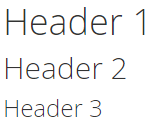 (opens full-size image in a new tab) |
| Bold text | **bold text** |
bold text |
| Italicized text | *Italicized text* |
Italicized text |
| Link | [Link Title](https://www.example.com) |
Link Title |
| Inline code snippets | `Code` |
Code |
| Code blocks | ```{"FirstName":"John","lastname":"Smith","age":25}``` |
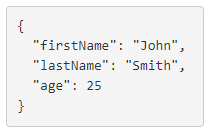 (opens full-size image in a new tab) |
| Ordered lists | 1. First Item2. Second Item3. Third Item |
1. First Item 2. Second Item 3. Third Item |
| Unordered lists | - First Item- Second Item- Third Item |
- First Item - Second Item - Third Item |
| Horizontal rule | --- |
(A thin horizontal line across the full width of the description) |
Unsupported Markdown
Cloud Management Platform does not interpret any other Markdown, including but not limited to:
- Tables
- Footnotes
- Custom headings
- Definition lists
- Strikethrough
- Task lists
- Emoji
- Highlights
- Subscript
- Superscript
- Block quote
Known issues
Known issue 1: Ordered and unordered lists overwrite each other when created immediately after one another. To avoid this, place any other type of content between the two lists.
| Issue example | Result |
|---|---|
1. Ordered First item2. Ordered Second item3. Ordered Third item- Unordered First item- Unordered Second item- Unordered Third item |
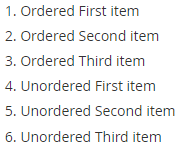 (opens full-size image in a new tab) |
- Unordered First item- Unordered Second item- Unordered Third item1. Ordered First item2. Ordered Second item3. Ordered Third item |
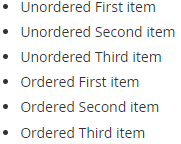 (opens full-size image in a new tab) |
| Solution example | Result |
|---|---|
- Unordered First item- Unordered Second item- Unordered Third item--- or # [any non-list content]1. Ordered First item2. Ordered Second item3. Ordered Third item |
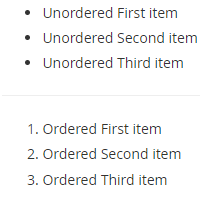 (opens full-size image in a new tab) |
Known issue 2: The Catalog list view does not show blueprint descriptions.