Flow control orchestration
4 minute read
Use flow control to prevent orders from starting or pause orders when known issues or scheduled downtime affect certain ecosystem integrations.
Enabling flow control
- Go to Admin > Flow Control Actions.
- Select Add, then select Create New.
- In the Create Flow Control dialog, fill in the required fields (Label and Control Type) and any top-level filters, then select Save.
Top-level filters
| Filter | Description |
|---|---|
| Groups | Select one or more groups to allow or pause orders with the group. |
| Blueprints | Select one or more blueprints to allow or pause orders for them. |
| Environments | Select one or more environments to allow or pause orders that have any items with any of the selected environments. |
| Resource Technologies | Select one or more resource technologies to allow or pause orders that have any items with any of the selected resource technologies. |
| Resource Handlers | Select one or more resource handlers to allow or pause orders that have any items with any of the selected resource handlers. |
Once saved, a new flow control action is created with minimal action code to apply the top-level filters. The new action is created in the disabled state.
Flow control action implementation
The flow control action plugin must contain a method named allow_start that returns a boolean value (True or False). This method runs for all enabled flow control actions right after orders are approved and before they are initiated.
The initial code for the flow control action includes logic to apply the top-level filters and determine whether the order can be started. You can extend this code to add logic based on parameter values specified on the order.
All order parameter values are available in the order_dict keyword argument; this dictionary contains parameter values for the order blueprint and all of its items.
If the order cannot be started, its status is set to Flow Control Paused (FCTLPAUSED). Orders paused by a flow control action are reevaluated whenever any flow control action is enabled, disabled, or updated.
Keyword arguments
The following keyword arguments are available to the action.
| Keyword argument | Description |
|---|---|
flow_control |
The flow control action object, which provides access to the action’s definition. It provides a method, allow_based_on_filters, that determines whether an order can be started based on the configured top-level filters. This method runs in the initial code generated when the flow control action is created. |
order |
The order object being evaluated to determine whether it can be started. |
order_dict |
A dictionary representation of the order, including all parameter values passed with the order. Use it to extend the logic of the initial flow control code generated when the action is created. See the sample below. |
job |
The top-level job for the order being evaluated. |
Order dictionary keyword argument
As noted above, the order_dict keyword argument contains all parameter values for the order, and you can use it to extend the logic in the allow_start method to determine whether the order can be started. A sample of this dictionary follows:
{
    "group": <Group: My Org>,
    "parameters": {
        "bp_param2": "bp2 value",
        "bp_param3": "bp3 value",
        "bp_param1": "bp1 value",
        "vm_size": "small",
    },
    "deploymentItems": {
        "server-bdi-7h85apqb": {
            "environment": <Environment: (vCenter) DEV>,
            "osBuild": <OSBuild: CentOS7-local-template (1)>,
            "parameters": {
                "hostname": 'myhostname101',
                "sc_nic_0": <ResourceNetwork: My_Network>,
                "vmware_datastore": <VmwareDatastore: My_Datastore>,
                "vmware_disk_type": 'Thin Provision',
            },
        },
        "plugin-bdi-ju7fnn7e": {
            "parameters": {
                "param1": "parm1 val",
                "param2": "param2 val",
            },
        },
    },
}
Order dictionary keys
The following table describes the top-level keys for the order_dict keyword argument.
| Key | Description |
|---|---|
group |
The Group object for the order group. |
parameters |
All blueprint parameter values specified on the order. |
deploymentItems |
All order deployment items. |
The value for deploymentItems contains a sub-dictionary of all order items, keyed by the API key found on the blueprint detail page.
The following table describes the keys for the deploymentItems dictionary:
| Key | Description |
|---|---|
parameters |
All deployment item parameter values specified on the order. |
environment |
Available only for server tiers; contains the Environment object specified on the order for that tier. |
osBuild |
Available only for server tiers; contains the OSBuild object specified on the order for that tier. |
Filtering orders paused by flow control
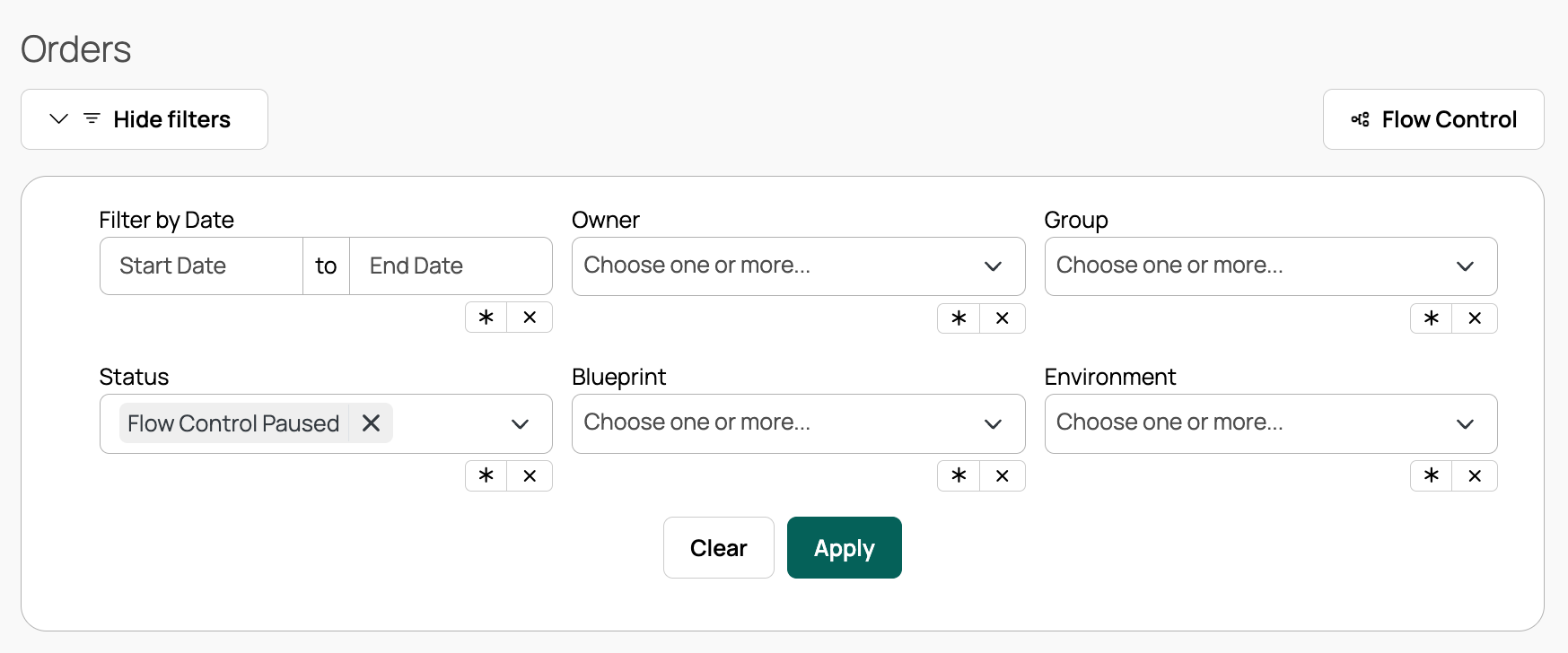
To see a list of all orders paused by a flow control action, go to Orders and add a filter for the status Flow Control Paused.
 (opens full-size image in a new tab)
Paused order reevaluation
All paused orders are reevaluated to determine whether they can be started after any flow control action is enabled, disabled, or modified.
Triggering modifications include any code changes and top-level filter changes. Any change triggers a “Flow Control Verify Paused Orders/Jobs” job, which asynchronously reevaluates all paused orders.