Cache vault secrets
6 minute read
Cloud Management Platform (CMP) can store credentials and other sensitive values in an external secrets manager (a vault provider) instead of in the CMP database. When CMP needs one of these values, it resolves it by calling the provider’s API.
By default, every access to a vault-backed value calls the provider. Environments that read these values frequently can approach or exceed the provider’s rate or quota limits.
Secret caching lets an administrator cache a resolved secret for a configurable time-to-live (TTL). While a cached value is within its TTL, CMP serves it directly from the cache without calling the provider, reducing API traffic and speeding up resolution.
Caching is opt-in and off by default. Until an administrator sets a TTL, CMP resolves every secret from the provider on every access, exactly as before. Upgrading CMP does not enable caching or change existing behavior.
This topic assumes you have already configured a vault provider. See Use password vaults.
How it works
- No TTL set (default): the value is resolved from the provider on every access. Nothing is cached.
- TTL set: the first access resolves the value from the provider and stores it, encrypted, with the time it was fetched. Later accesses within the TTL are served from the cache. Once the TTL elapses, the next access re-fetches from the provider and resets the timer.
Cached values are stored encrypted at rest, like other sensitive fields in CMP, and the cached value itself is never returned by the API. Caching applies to every supported provider (HashiCorp Vault, Azure Key Vault, AWS Secrets Manager, CyberArk, and Keeper) and everywhere a vault-backed value is used.
Two levels of TTL
You can set a TTL in two places. A TTL is a whole number plus a unit of days or months.
| Setting | Where | Effect |
|---|---|---|
| Provider default TTL | On the vault provider’s settings form. | An optional default copied onto new secret mappings when they are created under this provider. It is a starting value only; changing it later does not affect existing secrets. |
| Per-secret TTL | On an individual secret mapping, on the Secrets tab of a vault. | Governs caching for that one secret and overrides the provider default. Clearing a secret’s TTL disables caching for it, even if the provider has a default. |
Enable caching
Set a default TTL for new secrets on a provider
-
Go to Admin and select Password Vaults, then open a vault provider.
-
Select Edit, set the Default secret cache TTL to a value, and choose a unit (days or months).
-
Select Save. New secrets added under this provider inherit this TTL; existing secrets are unchanged.
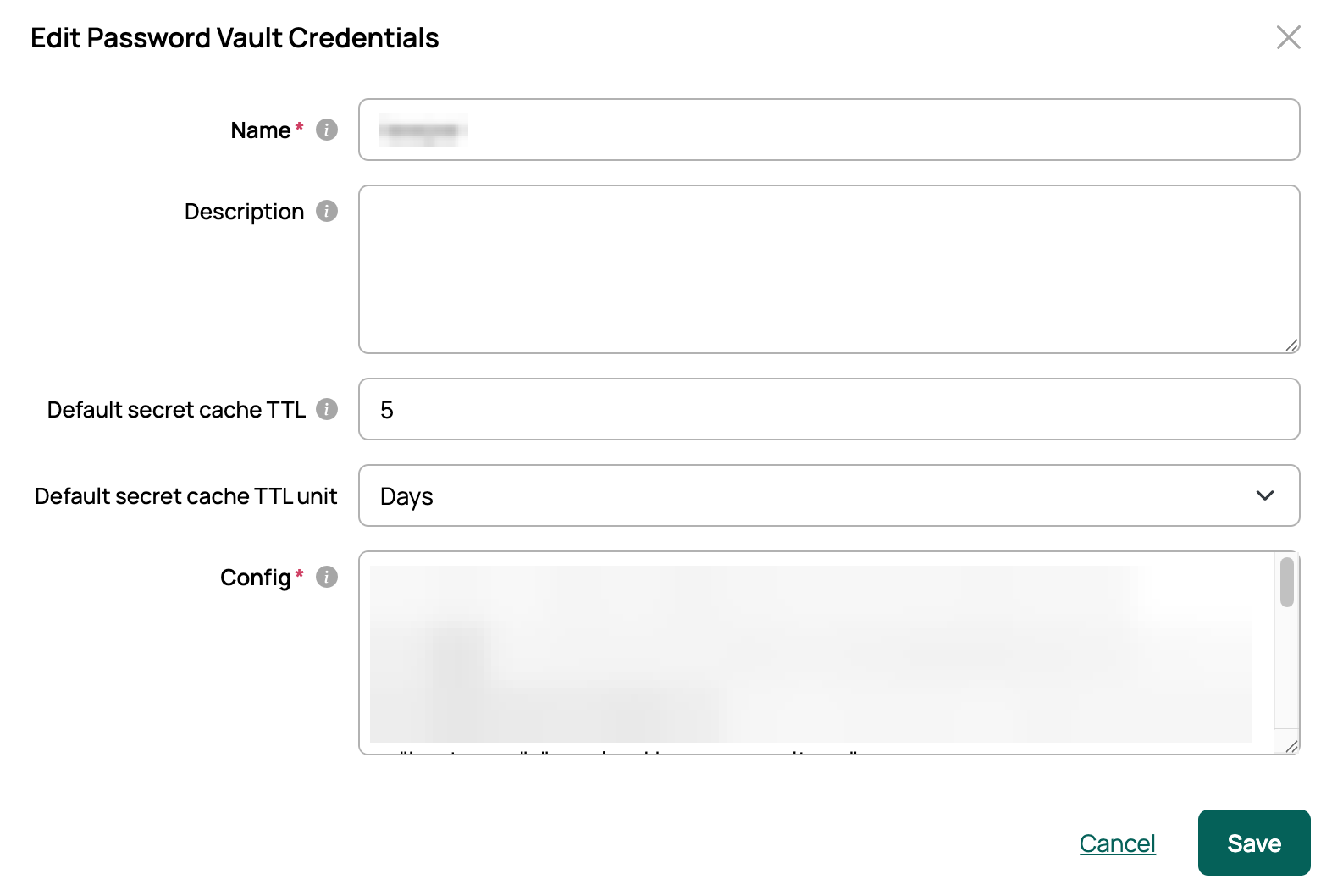
Leave the default blank to decide caching per secret instead.
Set or change the TTL on an individual secret
-
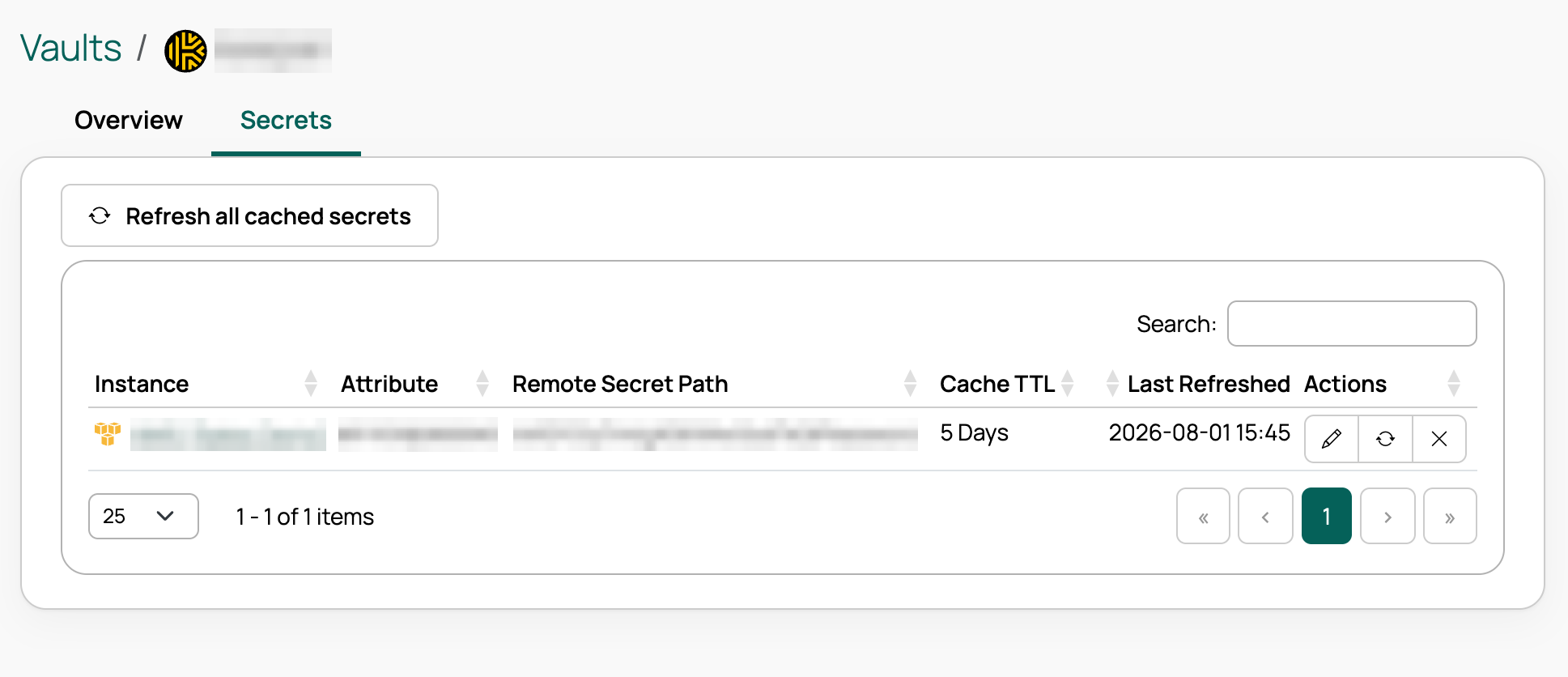
Open the vault provider and go to the Secrets tab. Each secret row shows its Cache TTL and Last Refreshed time (with an Expired badge when the value is past its TTL), plus an Actions column of icons.
-
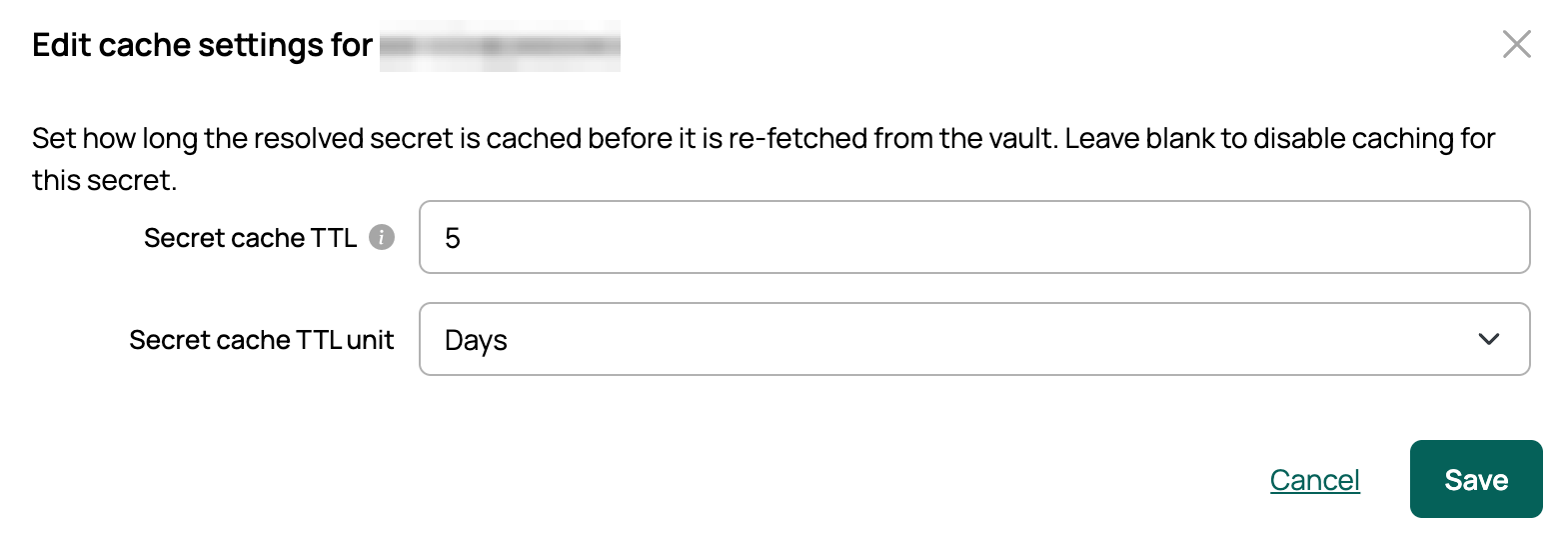
Select the secret’s Edit cache settings (pencil) icon to set a TTL value and unit, or leave Secret cache TTL blank to disable caching.
-
Select Save. Setting a TTL enables caching for that secret; clearing it disables caching and removes any stored value.
Refresh cached secrets manually
Because a cached value is not re-read until its TTL expires, you can refresh manually when a secret changes in the backend.
- Refresh a single secret: select the Refresh now icon on the secret’s row in the Secrets tab, then select Refresh to confirm. This re-fetches the secret from the provider and resets its cache timer.
- Refresh all secrets for a provider: select Refresh all cached secrets on the Secrets tab, then confirm. This re-fetches every cached secret under the provider and appears only when a secret is cached.
A refresh runs as soon as you confirm and reports how many secrets succeeded. If one secret fails, the others still proceed.
Delete a secret’s cache
To turn caching off for a single secret in one step, select the Delete cache and TTL icon in the secret’s Actions column on the Secrets tab, then select Delete to confirm. This clears the TTL and purges the stored value, so the secret resolves from the provider on every access again. The icon appears only when caching is enabled for that secret.
This produces the same result as clearing the TTL through Edit cache settings.
Important behaviors
- Rotated secrets are not seen until the TTL expires or you refresh. If a value changes in the provider while a cached copy is still within its TTL, CMP keeps serving the older cached value until the TTL elapses or you refresh. Choose a TTL that fits how often your secrets rotate, and refresh after a known rotation.
- Changing a secret’s reference clears its cache. Editing the path or key a secret points to discards the cached value; the next access resolves fresh from the provider.
- Disabling caching removes the stored value. Clearing a TTL (through Edit cache settings or Delete cache and TTL in the Secrets tab) purges any value held in the cache.
- Failed or empty resolutions are never cached. If the provider cannot return a value, nothing is stored and CMP tries again on the next access.
Manage caching with the API
The same capabilities are available through the CMP v3 API (administrator access required).
| Action | Request |
|---|---|
| Set or change a secret’s TTL | PATCH /api/v3/cmp/vaultSecretMappings/{id}/ with cacheTtlValue and cacheTtlUnit (send both as null to disable caching). |
| Refresh a single secret | POST /api/v3/cmp/vaultSecretMappings/{id}/refresh/. Optionally include cacheTtlValue / cacheTtlUnit to set a new TTL during the refresh. |
| Delete a secret’s cache and TTL | POST /api/v3/cmp/vaultSecretMappings/{id}/clearCache/. Disables caching by clearing the TTL and purging the stored value. Takes no request body. |
| Refresh all secrets for a provider | POST /api/v3/cmp/vaults/{technology}/{id}/refreshCache/, where {technology} is the provider type (for example, keepervault, hashicorp, azurekeyvault, awssecretsmanager, or cyberark). |
Each secret mapping also exposes read-only fields describing its cache state: cachedAt (when the value was last fetched) and cacheStatus (not_cached, valid, or expired). The cached value itself is never returned. A bulk refresh returns a summary of how many secrets were refreshed and which failed; if every secret under the provider fails, the response returns HTTP 502.
Choose a TTL
Balance two goals: fewer provider API calls (longer TTL) versus seeing rotated secrets sooner (shorter TTL). A good starting point is a TTL shorter than your secret-rotation interval, plus a manual refresh whenever you rotate a secret out of band.