Make your first request
Authenticate, list servers, and read the response
3 minute read
The API is RESTful. It has predictable, resource-oriented URLs, accepts JSON request bodies, returns HAL-encoded JSON, and uses standard HTTP verbs and status codes. Some endpoints also accept form-encoded bodies and multipart form data for file uploads, such as importing blueprints.
CMP ships an interactive console that lists every endpoint, the verbs each accepts, and the responses they return. You can execute requests from it and see the results. It is generated from the running version, so it always matches the API you are calling.
Open it in either of these ways:
Both open the console at /api-docs/v3/cmp/.
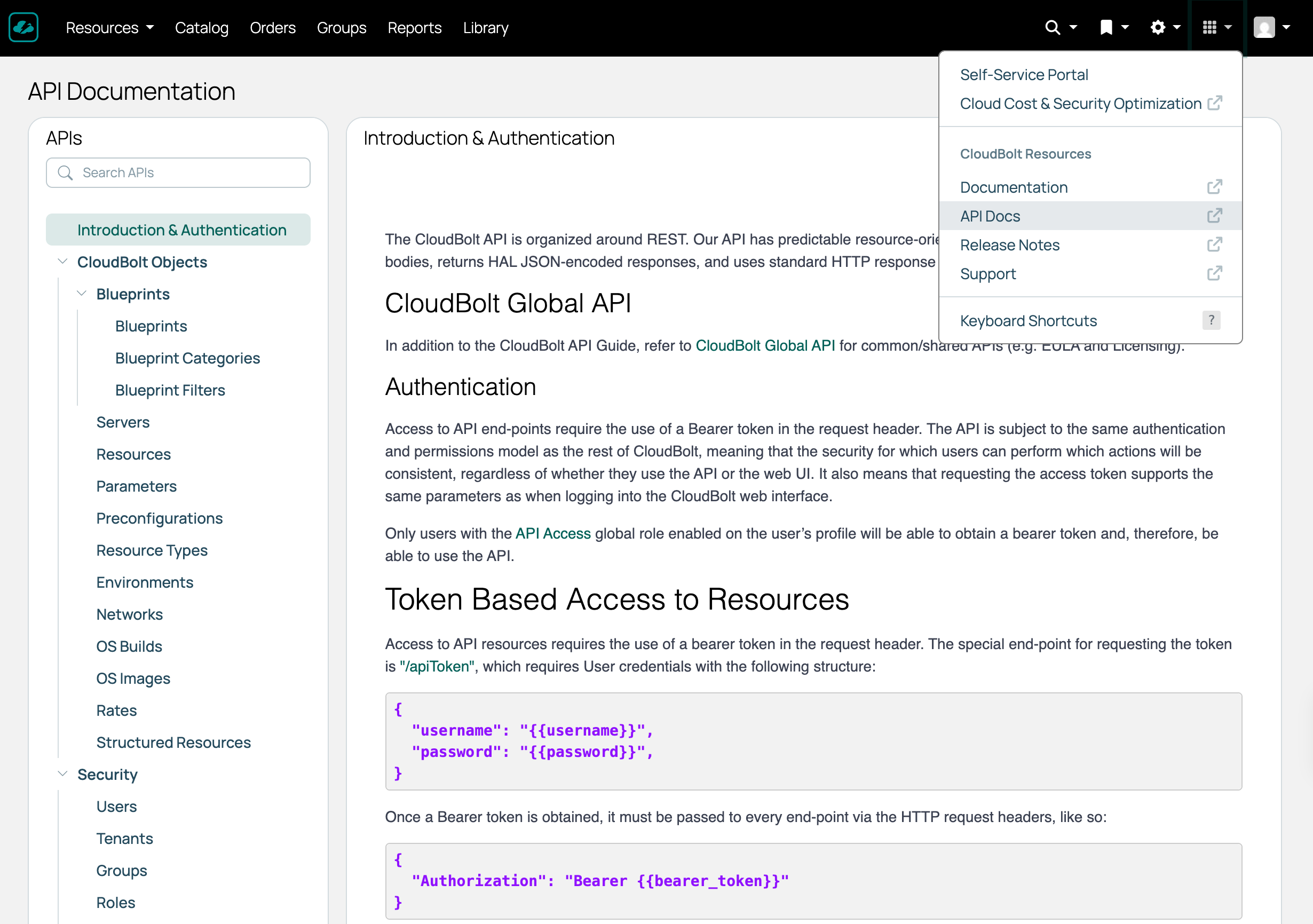 (opens full-size image in a new tab)
Endpoints that address a single object take its ID in the path, such as /environments/{id}/ or /gcp/projects/{id}/networks/{network_id}. Use the Global ID, described in Object IDs.
To find one, list the collection with a GET request. Each object in _embedded carries its id, its title, and a _links section whose self href is the full path to that object. In the response below, the resource handler’s Global ID is RH-d6t7k254.
{
    "_links": {
        "self": {
            "href": "/api/v3/cmp/resourceHandlers/vmware/?page=1",
            "title": "List of Vmware - Page 1 of 1"
        }
    },
    "total": 1,
    "count": 1,
    "_embedded": {
        "vmware": [
            {
                "_links": {
                    "self": {
                        "href": "/api/v3/cmp/resourceHandlers/vmware/RH-d6t7k254/",
                        "title": "vCenter"
                    },
                    "environments": [
                        {
                            "href": "/api/v3/cmp/environments/ENV-7dhgh5wr/",
                            "title": "(vCenter) Long-Term"
                        },
                        {
                            "href": "/api/v3/cmp/environments/ENV-5w5y1d4q/",
                            "title": "(vCenter) Short-Term"
                        }
                    ],
                    "clusters": {
                        "href": "/api/v3/cmp/resourceHandlers/vmware/RH-d6t7k254/clusters/",
                        "title": "Clusters for vCenter"
                    },
                    "syncVMs": {
                        "href": "/api/v3/cmp/resourceHandlers/vmware/RH-d6t7k254/syncVMs/",
                        "title": "Synchronize VMs from vCenter"
                    },
                    "templates": {
                        "href": "/api/v3/cmp/resourceHandlers/vmware/RH-d6t7k254/templates/",
                        "title": "Templates for vCenter"
                    },
                    "networks": {
                        "href": "/api/v3/cmp/resourceHandlers/vmware/RH-d6t7k254/networks/",
                        "title": "Networks for vCenter"
                    }
                },
                "name": "vCenter",
                "id": "RH-d6t7k254",
                "description": "",
                "host": "10.0.0.0",
                "port": 443,
                "username": "company@vsphere.local",
                "ssl": true,
                "virtualFolderPath": "CloudBoltVMs/{{ group }}"
            }
        ]
    }
}
The API applies the same roles and permissions as the web interface. What a request is allowed to do depends on the permission tier the endpoint belongs to and which objects the signed-in user is allowed to see.
Nearly every endpoint falls into one of four tiers. Reading is far more widely permitted than writing.
| Tier | Reading (GET) | Creating, updating, deleting |
|---|---|---|
| Open | Any signed-in user | Any signed-in user |
| Admin write | Any signed-in user | CloudBolt Admin or Super Admin |
| Managed write | Any signed-in user | CloudBolt Admin or Super Admin, or any user holding that object type’s manage admin permission |
| Admin only | CloudBolt Admin or Super Admin | CloudBolt Admin or Super Admin |
The admin-only tier covers identity domains, the application, web, and support bundle logs, and system status. The system settings endpoint sits alongside them but also admits users holding the Global Viewer role.
To confirm the tier for a particular endpoint, open the API console and try the request. It lists the verbs each endpoint accepts, and anything outside your permissions comes back as 403.
Permission tiers govern whether you can call an endpoint. Object permissions then govern which objects are returned. An action you are not permitted to take returns HTTP 403. See Errors.
Listing a collection never returns objects you are not permitted to view, so two users can call the same endpoint and get different results.
A user with the Global Viewer role can see all objects but cannot modify any of them. This is useful for read-only integrations such as reporting, auditing, and cost analysis.
Authenticate, list servers, and read the response
Obtain a bearer token, then send it with every request
How the Cloud Management Platform (CMP) REST API is shaped: its URLs, identifiers, query parameters, responses, limits, and errors