MCP custom tools
5 minute read
Extend the built-in MCP tool set in Cloud Management Platform (CMP) with organization-specific tools.
Two ways to expose a tool
- MCP Tool Actions: purpose-built agent tools authored directly in CMP
- Existing server and resource actions: can be promoted to agent tools
Both are permission-aware, so agents only see and run what the authenticated user is entitled to.
After creating or modifying a custom tool, reconnect to the MCP server so the agent picks up the updated tool list.
MCP Tool Actions
An MCP Tool Action is a CMP action purpose-built as an agent tool. Every enabled MCP Tool Action that the authenticated user is permitted to run is automatically published as a first-class tool, including its name, description, input schema, and any annotations.
MCP Tool Actions are also discoverable and runnable through generic dispatcher tools:
| Tool | Description |
|---|---|
fetch_mcp_tool_actions |
List the MCP Tool Actions the authenticated user is permitted to run. Returns each action’s mcp_tool_name, mcp_tool_description, and a generated JSON input schema. |
run_mcp_tool_action(mcp_tool_name, parameters) |
Run the selected MCP Tool Action in-process. |
Create an MCP Tool Action
-
Go to Admin > MCP Tool Actions.
-
Select Add and select Create New to author the action from scratch.
Additional options- Create from Repository: sync the action from a source code repository
- Upload MCP Tool Action: import a previously exported action
-
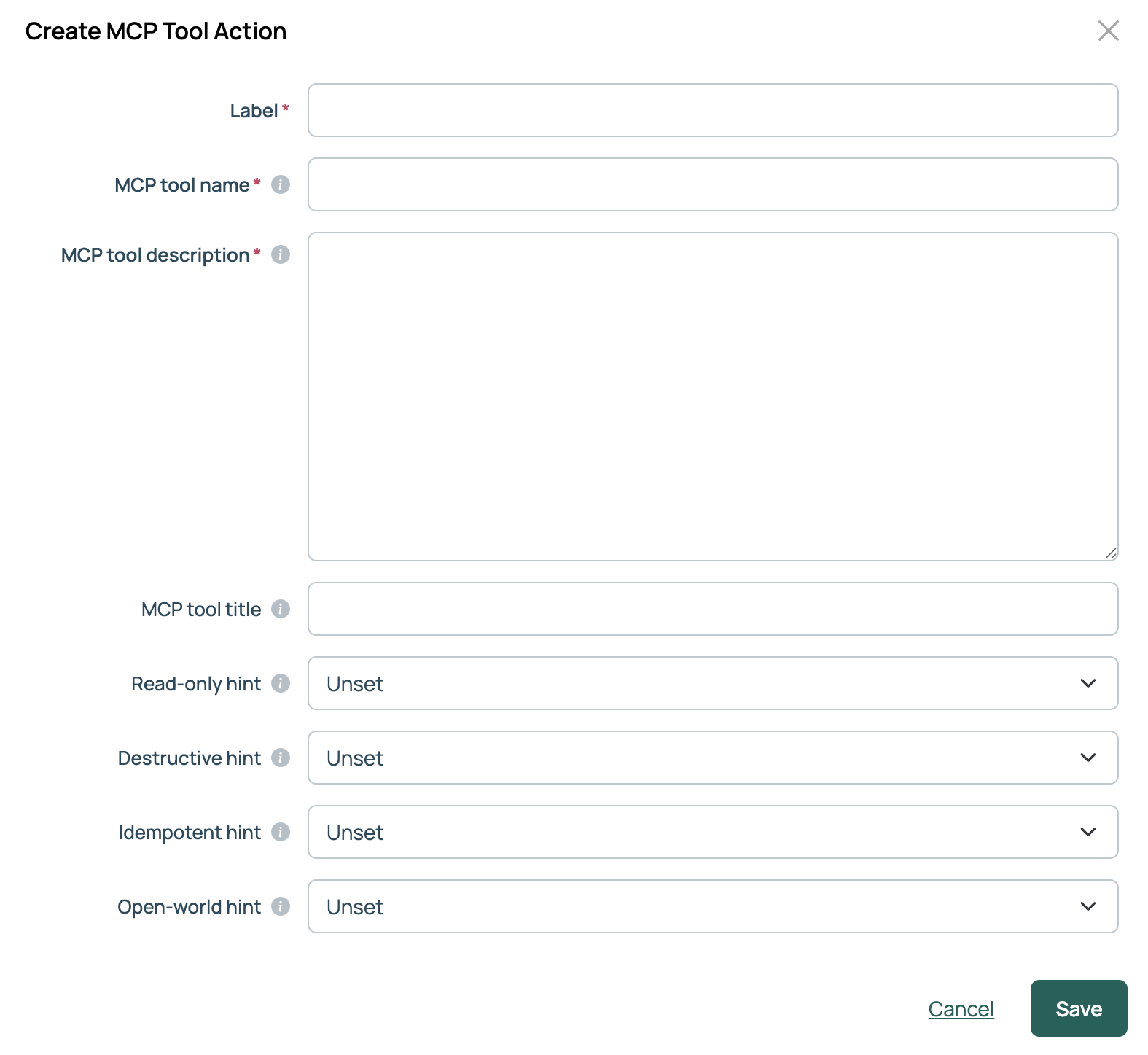
Complete the creation form. The fields are described in the table below.
-
Select Save. The action is created. Additional fields, including Synchronous Action, Roles, and any parameter default values, are available when you reopen the action to edit it.
-
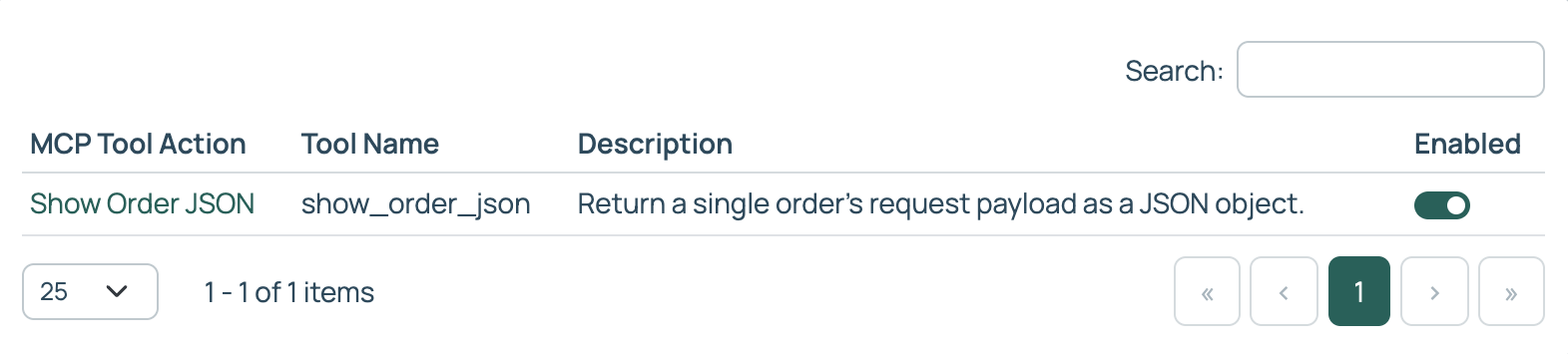
Enable the action from the MCP Tool Actions list page.
Field reference
| Field | Description |
|---|---|
| Label | Display name for the action in CMP. Allows spaces. |
| MCP tool name | Identifier the agent calls. Must be unique within its namespace. Restricted to ^[a-zA-Z0-9_-]+$. |
| MCP tool description | Natural-language explanation of what the tool does and when to use it. This is the primary signal the agent uses to select the tool. See Writing effective tool descriptions. |
| MCP tool title | Human-readable display title. When not set, the Label is used. |
| Read-only hint | The tool does not modify its environment. An agent may auto-approve a read-only tool. |
| Destructive hint | The tool may perform destructive updates. Only meaningful when Read-only hint is not set to Yes. |
| Idempotent hint | Repeated calls with the same arguments have no additional effect. Only meaningful when Read-only hint is not set to Yes. |
| Open-world hint | The tool interacts with external entities beyond CMP. |
| Synchronous Action | Displays when editing a created action. When selected, the tool returns its result inline. When unselected, the tool runs asynchronously and returns a job ID, pollable via fetch_job. |
| Roles | Displays when editing a created action. The roles that grant permission to run this action. |
The hint fields have three states: Unset (default) omits the annotation and the agent falls back to the MCP spec default. Yes and No emit true and false respectively.
Configure resource and server actions for MCP
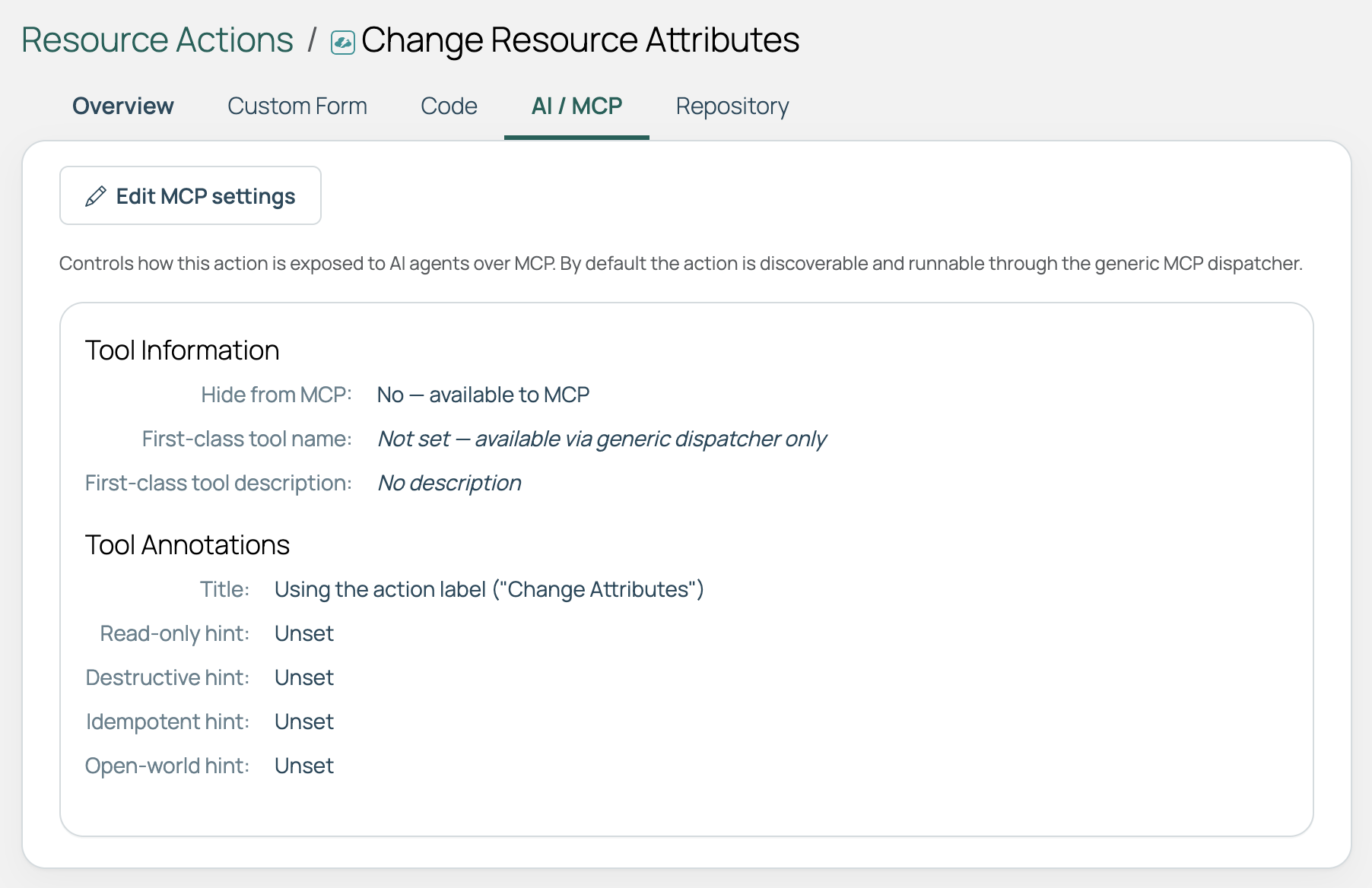
Existing resource and server actions can be exposed to agents without rebuilding them. On the action’s detail page, open the AI / MCP tab to view and edit the MCP settings.
 (opens full-size image in a new tab)
| Setting | Description |
|---|---|
| Hide from MCP | Yes excludes the action from MCP. No makes it available. |
| First-class tool name | Promotes the action to a named first-class tool. When not set, the action is available only via the generic dispatcher. |
| First-class tool description | The description published to the agent for this tool. See Writing effective tool descriptions. |
An agent cannot run a hidden action. Applies to MCP only: an action hidden from MCP continues to work as normal in the CMP UI.
Writing effective tool descriptions
When an agent connects, CMP publishes each tool’s name, description, input schema, and annotations. The agent matches the user’s request against those descriptions to select the right tool. The description is therefore the most important field for ensuring the correct tool is used.
| Principle | Detail |
|---|---|
| State the purpose and outcome | Lead with what the tool does and what it produces. For example: “Restart the application service on one or more servers and wait for it to come back healthy.” |
| Say when to use it and when not to | Disambiguation matters most when several tools look similar. For example: “Retrieves current order status; does not create or modify orders.” |
| Name key inputs and side effects | Mention key parameters and any side effects so the agent can provide the correct arguments. |
| Be specific | Vague descriptions cause the agent to overlook a purpose-built tool in favor of a generic one. |
Describing tool inputs
An agent also receives a description for each of a tool’s inputs, which it uses to decide what to pass. On an action input, set:
- Description: what the field is for and how to choose a value.
- Placeholder: a sample of the expected value. Available for string, password, and text parameters.
CMP publishes both alongside the input’s label in the tool’s input schema, so guidance written for people on the order form also reaches the agent. An input with neither is published with its label alone. This applies to MCP Tool Actions, Server Actions, and Resource Actions alike. See Action input parameters.
Version control and portability
MCP Tool Actions are first-class CMP objects and travel through CMP’s existing mechanisms:
- Source-code repository sync: push tools to and refresh from a Git repository.
- Blueprint export and import: move or share a curated toolset without manual reconfiguration.
Tool name prefixes
Each action family publishes under its own prefix, preventing name collisions between built-in tools and custom tools, and between action families.
| Action family | Prefix | Example | Promotion |
|---|---|---|---|
| MCP Tool Action | custom_ |
custom_restart_db |
Automatic |
| Resource Action | resource_action_ |
resource_action_restart_db |
Opt-in via AI / MCP tab |
| Server Action | server_action_ |
server_action_restart_db |
Opt-in via AI / MCP tab |
Related
- MCP server tools: The built-in tools your own tools sit alongside.
- MCP server integration: Connecting a client and reconnecting it to pick up a new tool.
- Action input parameters: The inputs an action collects, and the guidance you can attach to each.
- Server actions: Creating and managing the actions that can be promoted to tools.