VMware Cloud Director
4 minute read
Cloud Director is not installed by default and is not controlled by a feature flag. Run the script in Enable the vCloud Director resource handler to display the tile in the picker, where it is listed under its former name, vCloud Director.
Cloud Director groups resources into organizations, and each organization into virtual data centers. Cloud Management Platform (CMP) creates one environment for each organization and virtual data center pair you import, and provisions into it.
Before you begin
Collect the connection details for the Cloud Director API: the host, the port, and an account CMP can authenticate with. Decide whether CMP should verify the SSL certificate.
Add a Cloud Director resource handler
-
Go to Admin > Resource Handlers, select Add, then select vCloud Director.
-
Fill in the credentials dialog and select Continue.
-
Enter a name and an optional description, then select Done.
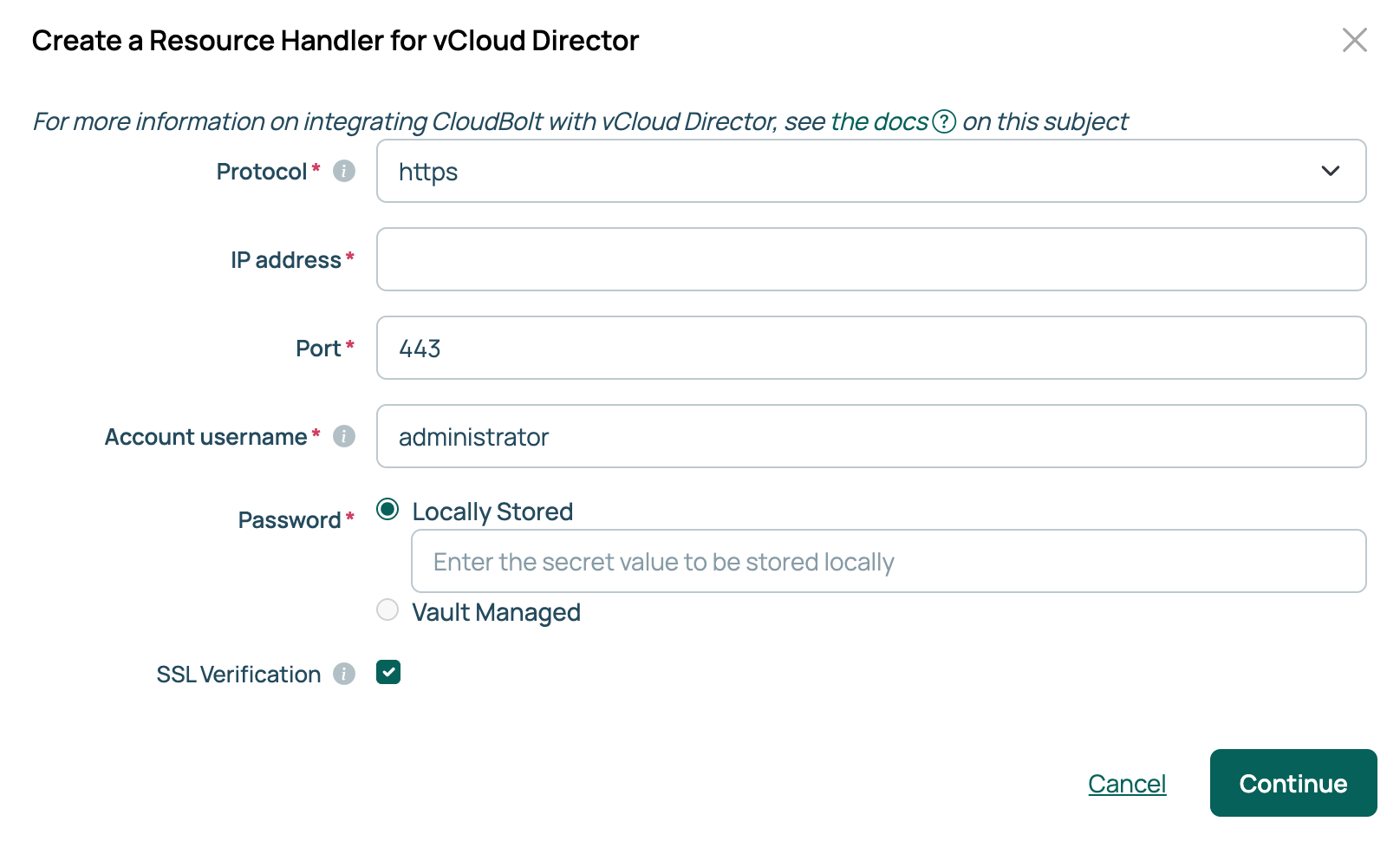
| Field | Description |
|---|---|
| Protocol | The protocol CMP uses to reach the Cloud Director API. This field is specific to Cloud Director. |
| IP address | The host name or IP address of the Cloud Director server. |
| Port | The API port. Defaults to 443. |
| Account username | The account CMP authenticates as. CMP uses it for every management action, including creating servers, power operations, and syncing. |
| Password | The password for that account. If the password vault feature is enabled, this field offers Locally Stored or Vault Managed. Select Vault Managed to read the secret from a configured vault provider. See Use password vaults. |
| SSL Verification | Whether CMP verifies the server’s SSL certificate. |
The settings dialog also includes Include All Published Vapp Templates, which is enabled by default and brings in every published vApp template rather than only those the account owns.
Import organizations
A new handler has no environments until you import an organization. CMP creates one environment for each organization and virtual data center pair.
- On the handler, open the Orgs and VDCs tab and select Import organizations.
- In Import vCloud Director Organizations, select organizations and submit the dialog.
CMP informs you if an organization exists in CMP but is no longer on the Cloud Director server. Environments assigned to it do not work.
To add another environment in an imported organization, use the plus icon on the Orgs and VDCs tab and choose an OrgVDC.
Import vApp templates
An environment needs at least one template to build a server. Open the vApp Templates tab and select Import templates.
Import storage policies
Storage policies determine where a server’s disks are placed. Open the Storage tab and select Import Storage Policies. To change one, select the edit icon beside it, then select Save in Edit Storage Policy.
Cloud Director parameters
Storage Policy is the parameter CMP populates for you based on the imported policies. The rest are added to an environment and must be given a value. CMP creates them once the first Cloud Director handler exists.
| Parameter | Description |
|---|---|
| Storage Policy | Required. The storage policy a server’s disks are placed on. |
| VCD Network Adapter Type | The network adapter type given to a new server. |
| VCD Disk Mode | The disk mode for the first disk. VCD Mode for Disk 2, VCD Mode for Disk 3, and VCD Mode for Disk 4 all set the same value for subsequent disks. |
| Disk Name | Required when adding a disk. The name Cloud Director gives the new disk. |
| VCloud Director User Data | User data passed to a new server, which can run scripts after it starts. See Customize VMs during provisioning. |
| VCloud Director Sysprep File | A Sysprep answer file used to customize a Windows template during provisioning. See Using Windows Sysprep with resource handlers. |
CMP sets Organization and Virtual Datacenter during the import, so they are not parameters you configure.
Related
- Resource handlers: the technologies CMP connects to, and how to add one.
- VMware vCenter: the handler for vSphere, rather than the Cloud Director layer above it.
- Environments: what CMP creates for each organization and virtual data center pair.
- Use password vaults: storing the account password in HashiCorp Vault, CyberArk, Keeper, AWS Secrets Manager, or Azure Key Vault.