Authenticate with an IAM role
An AWS handler can assume an IAM role instead of holding an access key and secret key
9 minute read
Cloud Management Platform (CMP) seeds three AWS technologies: Amazon Web Services, AWS GovCloud (US), and AWS China. All three work the same way, and this page describes the first. See AWS GovCloud (US) and AWS China for their differences. When adding a handler, you choose the regions to import, and CMP creates one environment for each VPC in each region.
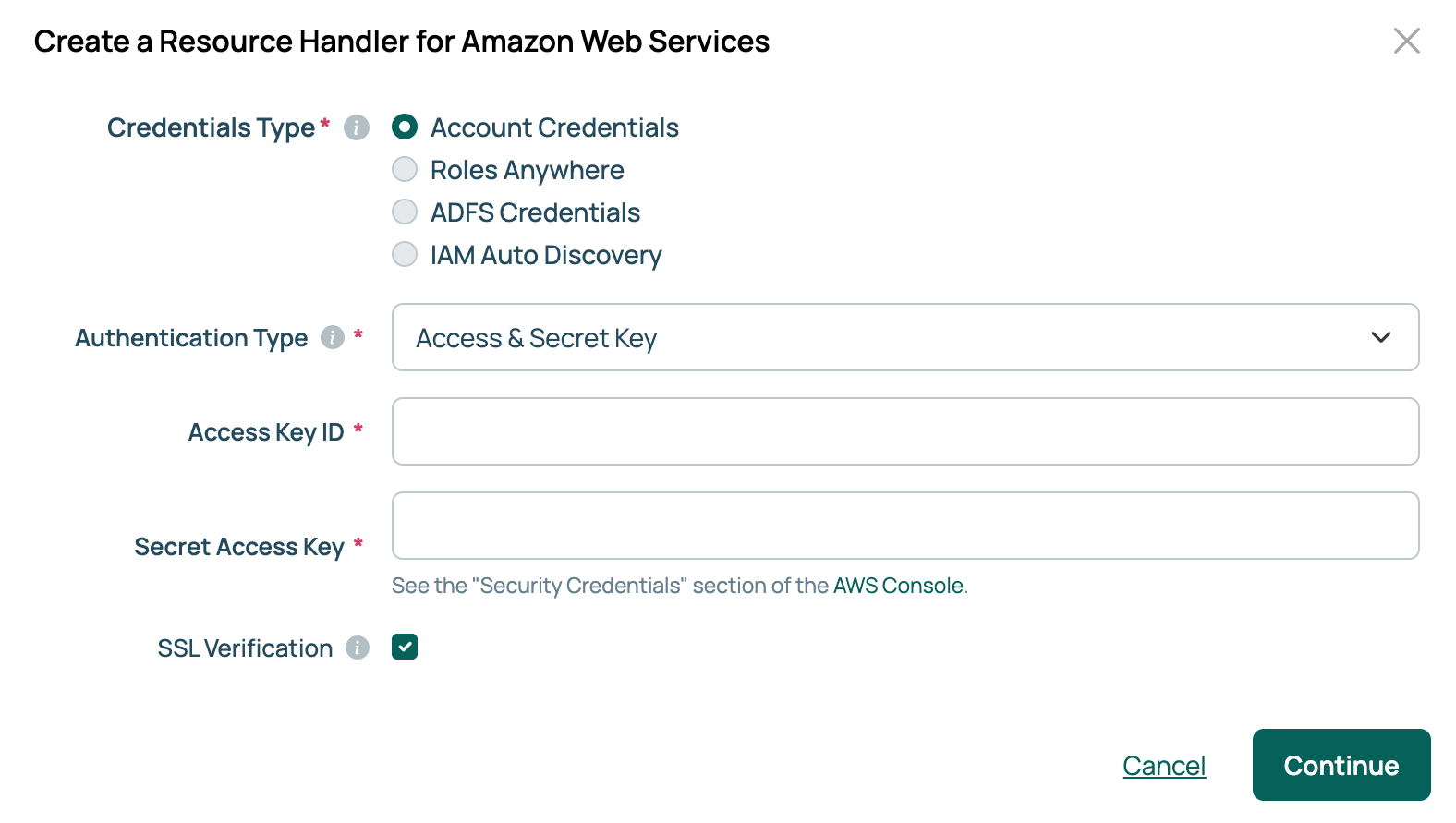
The first step of the add dialog is Credentials Type, which determines how CMP authenticates with AWS and which fields the rest of the form displays.
| Credentials Type | What you supply |
|---|---|
| Account Credentials, with Authentication Type set to Access & Secret Key | An Access Key ID and Secret Access Key for the account. Described below. |
| Account Credentials, with Authentication Type set to IAM Role | A stored AWS account profile plus the ARN of a role for CMP to assume, so no keys are held on the handler. See Authenticate with an IAM role. |
| Roles Anywhere | Three ARNs and a client certificate and key, which CMP exchanges for temporary credentials. See Authenticate with Roles Anywhere. |
| ADFS Credentials | Active Directory credentials and the ARN of a SAML role, for organizations that federate AWS access through ADFS. See Authenticate with ADFS. |
| IAM Auto Discovery | The name of the IAM role attached to the EC2 instance running CMP. Available only when CMP is installed on EC2. See Authenticate with IAM Auto Discovery. |
AWS GovCloud (US) and AWS China handlers always use an access key and secret key.
Regardless of the credential type, CMP requires AWS permissions to perform its work. These policies are the reference set for the rest of the AWS pages.
The minimum for adding a handler and provisioning through it:
{
    "Version": "2012-10-17",
    "Statement": [
        {
            "Effect": "Allow",
            "Action": [
                "ce:GetCostAndUsage",
                "ec2:AssociateIamInstanceProfile",
                "ec2:AttachVolume",
                "ec2:CreateTags",
                "ec2:CreateVolume",
                "ec2:DescribeAccountAttributes",
                "ec2:DescribeAddresses",
                "ec2:DescribeAvailabilityZones",
                "ec2:DescribeHosts",
                "ec2:DescribeIamInstanceProfileAssociations",
                "ec2:DescribeImages",
                "ec2:DescribeInstanceAttribute",
                "ec2:DescribeInstances",
                "ec2:DescribeInstanceStatus",
                "ec2:DescribeInstanceTypeOfferings",
                "ec2:DescribeInstanceTypes",
                "ec2:DescribeKeyPairs",
                "ec2:DescribeRegions",
                "ec2:DescribeReservedInstances",
                "ec2:DescribeSecurityGroups",
                "ec2:DescribeSubnets",
                "ec2:DescribeTags",
                "ec2:DescribeVolumeAttribute",
                "ec2:DescribeVolumes",
                "ec2:DescribeVolumesModifications",
                "ec2:DescribeVolumeStatus",
                "ec2:DescribeVpcs",
                "ec2:GetConsoleOutput",
                "ec2:ModifyVolume",
                "ec2:RebootInstances",
                "ec2:ReplaceIamInstanceProfileAssociation",
                "ec2:RunInstances",
                "ec2:StartInstances",
                "ec2:StopInstances",
                "ec2:TerminateInstances",
                "iam:PassRole",
                "kms:CreateGrant",
                "kms:GenerateDataKeyWithoutPlaintext",
                "kms:ReEncrypt*",
                "pricing:GetProducts",
                "ram:ListResources",
                "resource-groups:GetGroupConfiguration",
                "resource-groups:ListGroups",
                "ssm:CreateDocument",
                "ssm:DeleteDocument",
                "ssm:DescribeDocument",
                "ssm:DescribeInstanceInformation",
                "ssm:GetCommandInvocation",
                "ssm:ListDocuments",
                "ssm:SendCommand"
            ],
            "Resource": [
                "*"
            ]
        }
    ]
}
To let CMP run remote scripts on EC2 instances, add permission to create roles and instance profiles:
{
    "Version": "2012-10-17",
    "Statement": [
        {
            "Sid": "VisualEditor0",
            "Effect": "Allow",
            "Action": [
                "iam:CreateRole",
                "iam:AttachRolePolicy",
                "iam:CreateInstanceProfile",
                "iam:AddRoleToInstanceProfile"
            ],
            "Resource": "*"
        }
    ]
}
To import CloudWatch data into server statistics, add the CloudWatchReadOnlyAccess managed policy, or its equivalent:
{
    "Version": "2012-10-17",
    "Statement": [
        {
            "Effect": "Allow",
            "Action": [
                "autoscaling:Describe*",
                "cloudwatch:Describe*",
                "cloudwatch:Get*",
                "cloudwatch:List*",
                "logs:Get*",
                "logs:List*",
                "logs:StartQuery",
                "logs:StopQuery",
                "logs:Describe*",
                "logs:TestMetricFilter",
                "logs:FilterLogEvents",
                "oam:ListSinks",
                "sns:Get*",
                "sns:List*"
            ],
            "Resource": "*"
        },
        {
            "Effect": "Allow",
            "Action": [
                "oam:ListAttachedLinks"
            ],
            "Resource": "arn:aws:oam:*:*:sink/*"
        }
    ]
}
These steps use an access key and secret key. For the other credential types, select the link for your credential type in the table above, then return here for the second form.
Go to Admin > Resource Handlers.
Select Add.
Select the Amazon Web Services tile. Use the Filter providers box if you do not see it.
Leave Credentials Type set to Account Credentials and Authentication Type set to Access & Secret Key.
Enter the Access Key ID and Secret Access Key. Both keys are available in the Security Credentials section of the AWS Console. If the password vault feature is enabled, Secret Access Key offers Locally Stored or Vault Managed; select Vault Managed to read the key from a configured vault provider.
Select Continue. CMP validates the credentials, then opens a second form for the handler’s settings.
Enter a Name, select at least one entry under Available Regions, and complete the optional settings: a description, the S3 billing bucket, an SSM ARN for managing resources through AWS Systems Manager, Split by region to split AWS sync jobs by region, and Add Name & Annotation tags to new servers.
Select Done. CMP creates the handler and starts a job to import the regions and sync the account’s existing instances.
Use Verify Connection on the handler’s Overview tab to confirm the credentials work.
When an EC2 instance has an IAM profile, its ARN appears in the Amazon Web Services Details section on the server’s details page.
Each environment CMP creates for an AWS region carries a set of AWS-specific parameters on the environment’s AWS Parameters tab. The environment discovers which instance types, key pairs, and security groups are available in its region.
| Parameter | Description |
|---|---|
| Availability Zone | Launches instances into one availability zone within the region, so an application survives the loss of a single Amazon data center. A VPC subnet may be tied to a particular zone, in which case the subnet decides. |
| Elastic IP | Assigns an elastic IP at provision time. If there are none to choose from, an admin must allocate more in AWS. |
| Dedicated Host | Launches the instance onto the selected dedicated host. See Provision to EC2 Dedicated Hosts. |
| Dedicated Host Group | Launches the instance into the selected host resource group. See Provision to EC2 Dedicated Hosts. |
| Auto-Delete EBS Volumes on Termination | Deletes the attached volumes when the instance is deleted. True by default. |
| EBS Volume Type | The volume type used when provisioning or adding a disk. The options are io1, gp2, gp3, st1, sc1, and standard. |
| Instance type | The instance types offered on the order form. |
| IOPS | Input/output operations per second. AWS requires this for io1 volumes, so CMP shows the field only when EBS Volume Type is io1. |
| Key pair name | Name of a key pair defined in this resource handler, stored on an instance at launch to allow key-based access. |
| Security groups | The security groups offered on the order form. |
Importing an AMI creates an OS build for it. Import the same AMI into another region, and CMP reuses the existing OS build rather than creating a second one, as long as the build name matches the AMI name. An admin can point an AMI at a different OS build to override this. For the import procedure, see Import AMIs.
CMP can import AWS billing data and show billed costs for individual servers and for groups. The Billing and Reserved Instances tabs on an AWS handler are behind the resourcehandler::billingtab feature, which is disabled by default. See Resource handlers for how to enable a feature.
The Import Public Cloud Billing Data recurring job downloads the previous month’s data. It is enabled and runs at 2:00 AM on the first of each month. Change its schedule to align with when your bills arrive, or run it on demand to retrieve existing data.
CMP can provision instances onto your EC2 Dedicated Hosts, either a specific host or a host resource group. Set a value for Dedicated Host or Dedicated Host Group, not both. If both have a value, Dedicated Host takes precedence.
Importing also finds host resource groups shared with the account through AWS Resource Access Manager, if the handler’s credentials have the ram:ListResources and resource-groups:GetGroupConfiguration permissions. Without them, CMP imports only the groups the account owns.
Where an environment has no values for either parameter, because none have been imported or none exist, the order form shows a free-text field and rejects a name that does not resolve.
One AWS error is worth recognizing. An error occurred (InvalidParameterValue) when calling the RunInstances operation: Multiple resource groups match the host bound licenses in request means the AMI is tied to a license configuration in a host group, but no host group was selected. Select an AMI without a license configuration, or select the host group.
Beyond disk size, AWS disks carry a volume type and, for some types, a minimum size that AWS enforces.
A modification order placed through the API accepts these parameters when adding or changing a disk:
disk_size: the new size for the original volume.new_disk_size: the size of a volume to add.ebs_volume_type: the type of the new volume. Accepted values are io1, gp2, gp3, st1, sc1, and standard.iops: accepted with the io1 volume type.aws_volume_encryption: True or False, to encrypt the added volume.aws_volume_encryption_key_arn: encrypts with a KMS key other than the account default. Leave it blank to use the account key. Single-region and multi-region KMS keys both work, and a multi-region key must be replicated to the regions where you plan to use it.AWS relies on SSH keys to reach instances, and running remote scripts on Windows requires additional configuration. CMP will use a password if supplied, as described under Passwords. If you provide an SSH key instead, CMP asks EC2 for the Administrator password, which works only when the instance is configured in EC2 for get_password_data to succeed.
To run remote scripts without a username and password, enable tech-specific script execution.
An AWS handler can assume an IAM role instead of holding an access key and secret key
IAM Roles Anywhere lets an AWS handler authenticate with a certificate instead of an access key and secret key
An AWS handler can authenticate through Active Directory Federation Services (ADFS) instead of an access key and secret key
Where Cloud Management Platform (CMP) runs on an EC2 instance, an AWS handler can use the IAM role attached to that instance and hold no credentials at all
Where an AWS organization holds many member accounts, Cloud Management Platform (CMP) can add each as a child of the management account’s resource handler
AWS GovCloud (US) and AWS China handlers work like standard AWS handlers, with a few differences covered on this page
Importing an Amazon Machine Image makes it available for provisioning in Cloud Management Platform (CMP) as an OS build