Appliance security
Follow your organization’s information security best practices when protecting Cloud Management Platform (CMP)
9 minute read
This guide includes two suggested designs:
This document describes both architectures. We recommend you adapt them to your deployment’s needs.
The CMP appliance is available as a complete OS (RHEL 8 or Oracle Linux 8) and can be configured to run either CMP or OneFuse.
The appliance can run only a single product at a time (configured during first boot). If you would like to run both CMP and OneFuse, deploy a copy of this design for each product.
The appliance is the building block for both of our reference architectures: single-node and distributed.
CMP is based on a standard three-tier application model (web, application, and database) running on Linux, the Apache HTTP Server, PostgreSQL, and Django. Users interact with the application through a browser-based client, or by integrating it into their own tools using the CMP API.
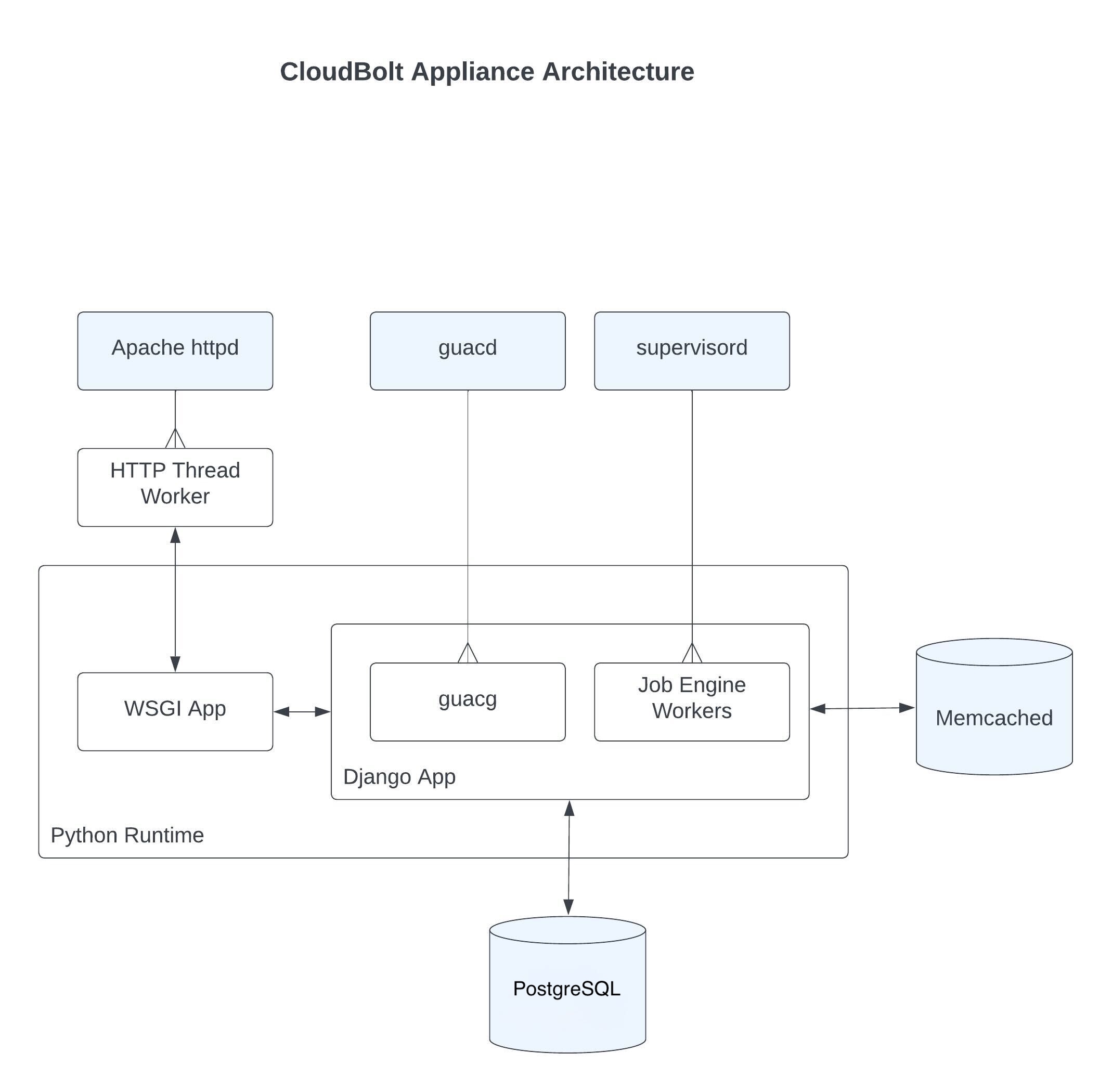 (opens full-size image in a new tab)
systemctl or apachectl. Run apachectl -v for version information, or systemctl restart httpd to restart the web server and the Django application.supervisorctl. To restart the job engine, run supervisorctl restart jobengine:*. Restarting the job engine stops any running jobs.Follow the quick start guide to install CMP and create a functional environment running on a single VM appliance.
This architecture is simple to manage and includes all functionality available within CMP.
Improve CMP availability by leveraging hypervisor HA, such as VMware HA or Hyper-V clustering, to mitigate the impact of hardware failures. The single appliance does not provide application-level high availability, so during hardware failures, some downtime is introduced as the appliance restarts.
The single appliance offers a simple solution for disaster recovery (DR), as recovery requires only restoring a single VM.
When performing DR planning, ensure that the restoration of the CMP appliance receives due attention. DR plans for other applications may require CMP’s availability in order to provision replacement services during a DR event.
To protect CMP, back up the appliance so that you can revert it to a known working state. Because a CMP appliance runs as a self-contained VM, the backup process is as simple as protecting the entire VM in your backup solution. This keeps ongoing backups of the production environment, and any necessary restores, simple to manage. The appliance includes a PostgreSQL database, so when you configure your backup solution, make sure your backup software’s agent also protects the cloudbolt database when capturing the VM’s state.
Alternate methods of extracting state (file-level and database-level backups) from the CMP appliance can be used for migrations and testing. However, for ongoing backups of a production environment where availability is key, such procedures may be unacceptably complex during a disaster recovery scenario. For the full procedure, see Back up Cloud Management Platform.
In a distributed architecture, we separate CMP roles to provide scaling and improve availability. If all components of your solution are highly available, we consider CMP highly available.
The following diagram shows an architecture in which the web server and job engine roles have been split using a Multi-AZ database service and a highly available file server.
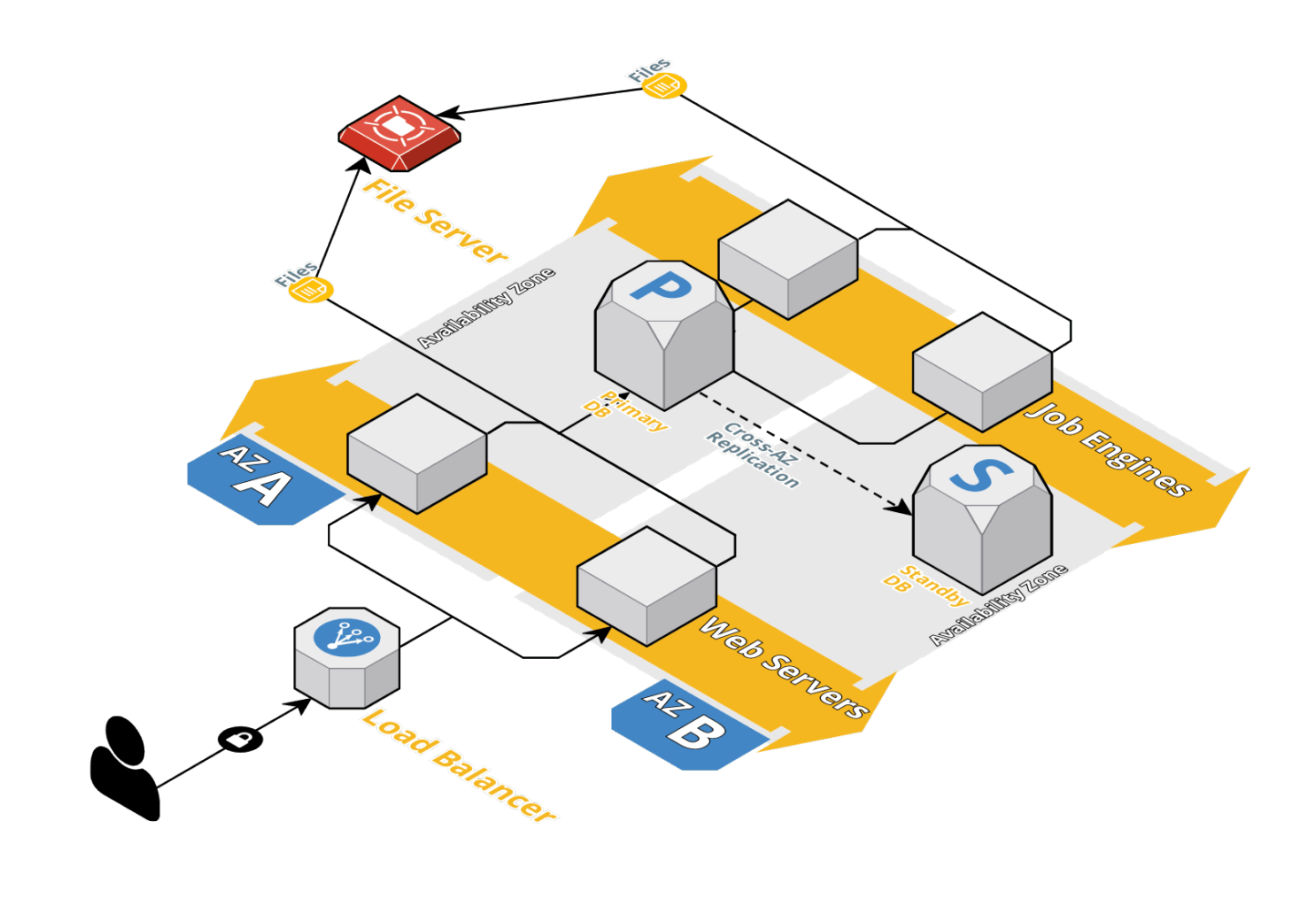 (opens full-size image in a new tab)
The web server is the main building block of the CMP distributed architecture. It contains the main application code and is responsible for providing the web interface and APIs.
To add multiple web servers to your deployment, you need a load balancer, which provides high availability for the CMP web service and distributes web traffic across the servers. Make sure your load balancer service is also highly available.
Load balancing CMP’s web role is very similar to many other HTTPS applications, with the key details listed in the table below.
| Requirement | Details |
|---|---|
| HTTPS termination | The load balancer is not required to terminate SSL, but you can enable it if you want to use web application firewall functionality on your load balancer service, or to simplify provisioning of a trusted SSL certificate. |
| Stickiness | Cookie-based or SSL session ID-based stickiness is required, as browser sessions are not shared between web servers. |
| Health monitor | Recommended to ensure traffic is not sent to broken nodes. Use HTTPS GET /_/features/ and expect HTTP status 200 OK. |
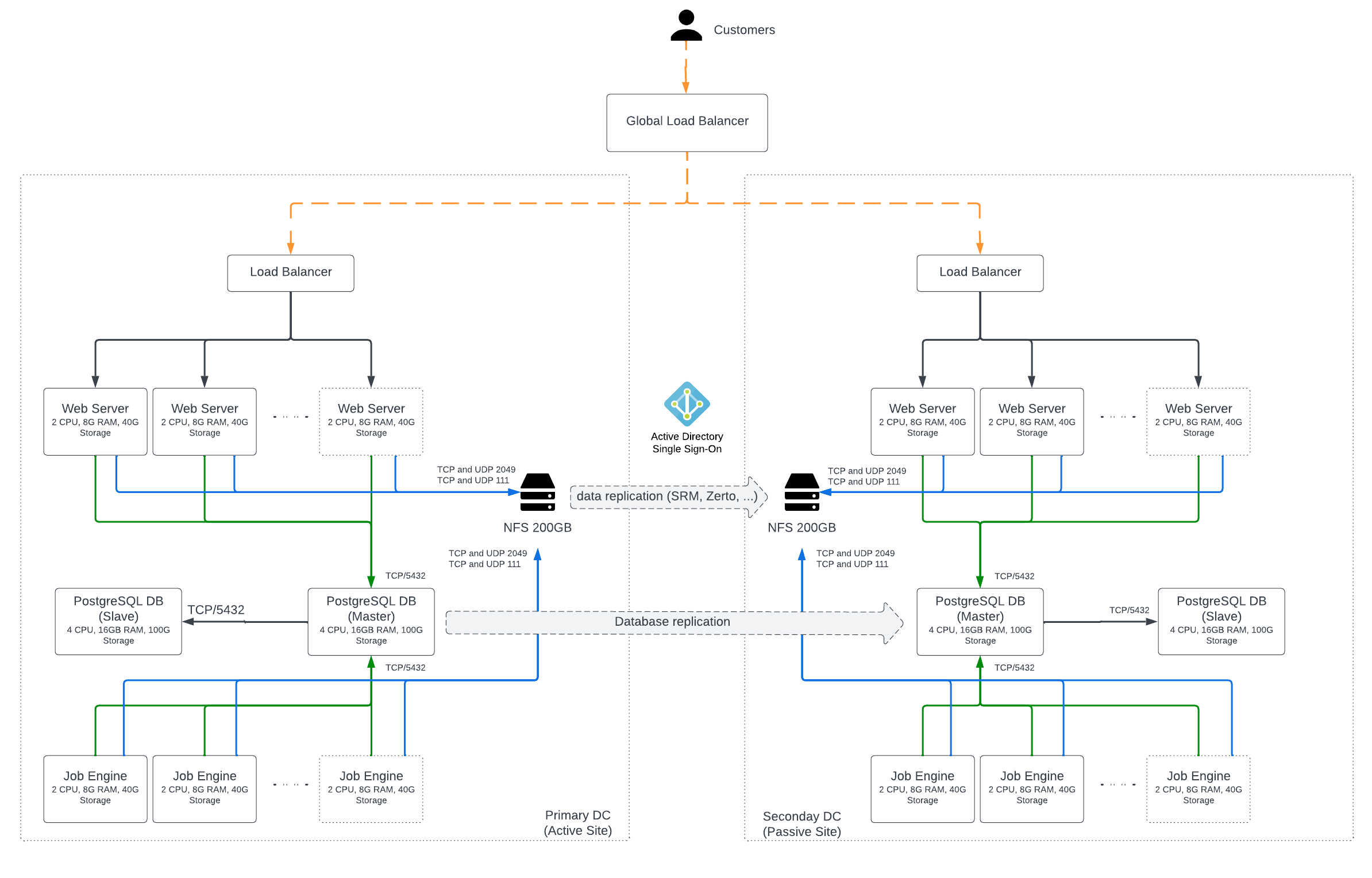 (opens full-size image in a new tab)
The job engine is responsible for processing all background jobs in the platform. Scale it according to the number of jobs being processed in your CMP environment.
Adding additional job engines does not require a load balancer. Configure each job engine node with the shared database, file services, and CMP deployment secret keys.
As job engines are added to an environment, they distribute load equally by default. If you want to direct specific job types to different nodes, for example, to ensure resource handler sync jobs are processed on dedicated job engine hosts, see Run or exclude specific job types.
While file service is not a CMP role, it is an important dependency in a distributed CMP setup.
In a single-node environment, assets like CMP plugins are stored on the appliance’s local filesystem. To make these assets available to all web server and job engine nodes, you need to provide a shared filesystem for these nodes.
Similarly, all nodes require access to the same shared CMP database. This should also be provisioned externally.
In a public cloud deployment, it is a common mistake to treat the two as one. Access to multiple availability zones is often within network-latency bounds, allowing for fully synchronous replication between two independent sites.
When considering such a topology, also ensure that snapshots are available for both the file service and the database. These provide alternate recovery points and protect against logical corruption of the CMP platform as part of a disaster recovery plan.
One analogy is that RAID is not a backup, since data corruption would be mirrored to your alternate site instantaneously.
CMP can use a number of different network storage protocols supported by the underlying OS. We recommend using NFS as your network storage protocol, as it is widely supported and there are often already highly available solutions in place that CMP can leverage.
Both the CMP web servers and the job engine VMs require the following directories to be stored on a shared file system. It is important for platform stability, particularly if you are using alternative shared filesystems, to ensure that the filesystem is synchronously replicated.
| Path |
|---|
/var/opt/cloudbolt |
/var/log/cloudbolt/jobs |
/var/www/html/cloudbolt/static |
CMP can be considered three services in terms of high availability:
By default, all of these services run on a single machine. They can also each run on a separate machine or multiple separate machines. For example, seven separate machines could contain two web servers, three job engines, and a primary database that replicates to a standby.
When configured behind a load balancer, the loss of any web server only affects the user sessions running on that server. The end-user experience during a web server failure is being logged out and needing to log in again to complete their work.
When using SSO, the impact on end users is minimized, as they can log in automatically and continue their requests.
When a job engine node fails, any jobs in progress on that node fail and require manual intervention to restart. From an end-user perspective, the order fails. However, when a job fails, the affected user can retry it in the CMP portal, so this scenario often does not require administrator involvement.
These are the critical dependencies in a highly available deployment, and the failure of any of them renders the platform unusable. The availability of your deployment is only as good as the availability of these services, so it is important that they are well understood.
When commissioning a distributed HA deployment of CMP, test the deployment by simulating network or node failures.
For example, errors in configuring a database connection string or NFS mount point could result in a CMP platform outage, such as when accessing an AWS EFS mount target across availability zones.
If you require assistance with deploying or validating your deployment, contact Support.
Where available, CMP can be configured to use a public cloud provider or other managed services in your environment to reduce operational cost, as they provide services suitable for highly available deployments.
| Service | AWS | Azure | Requirement |
|---|---|---|---|
| Database | Amazon RDS for PostgreSQL | Azure Database for PostgreSQL | PostgreSQL 14 or 18, the same major version as the database on your CMP instances. New installations use PostgreSQL 18. |
| File services | Amazon Elastic File System | Azure Files | NFS service |
| Load balancer | Elastic Load Balancing - Application Load Balancer | Azure Load Balancer | HTTP(S) load balancer |
For deployment guidelines for public cloud environments, see Set up high availability in AWS and Set up high availability in Azure.
Follow your organization’s information security best practices when protecting Cloud Management Platform (CMP)
Size your Cloud Management Platform (CMP) deployment based on the workloads you expect it to manage
Ports and services used by the Cloud Management Platform (CMP) appliance
Encrypt the connection between Cloud Management Platform (CMP) and an external PostgreSQL database