Orders and jobs
3 minute read
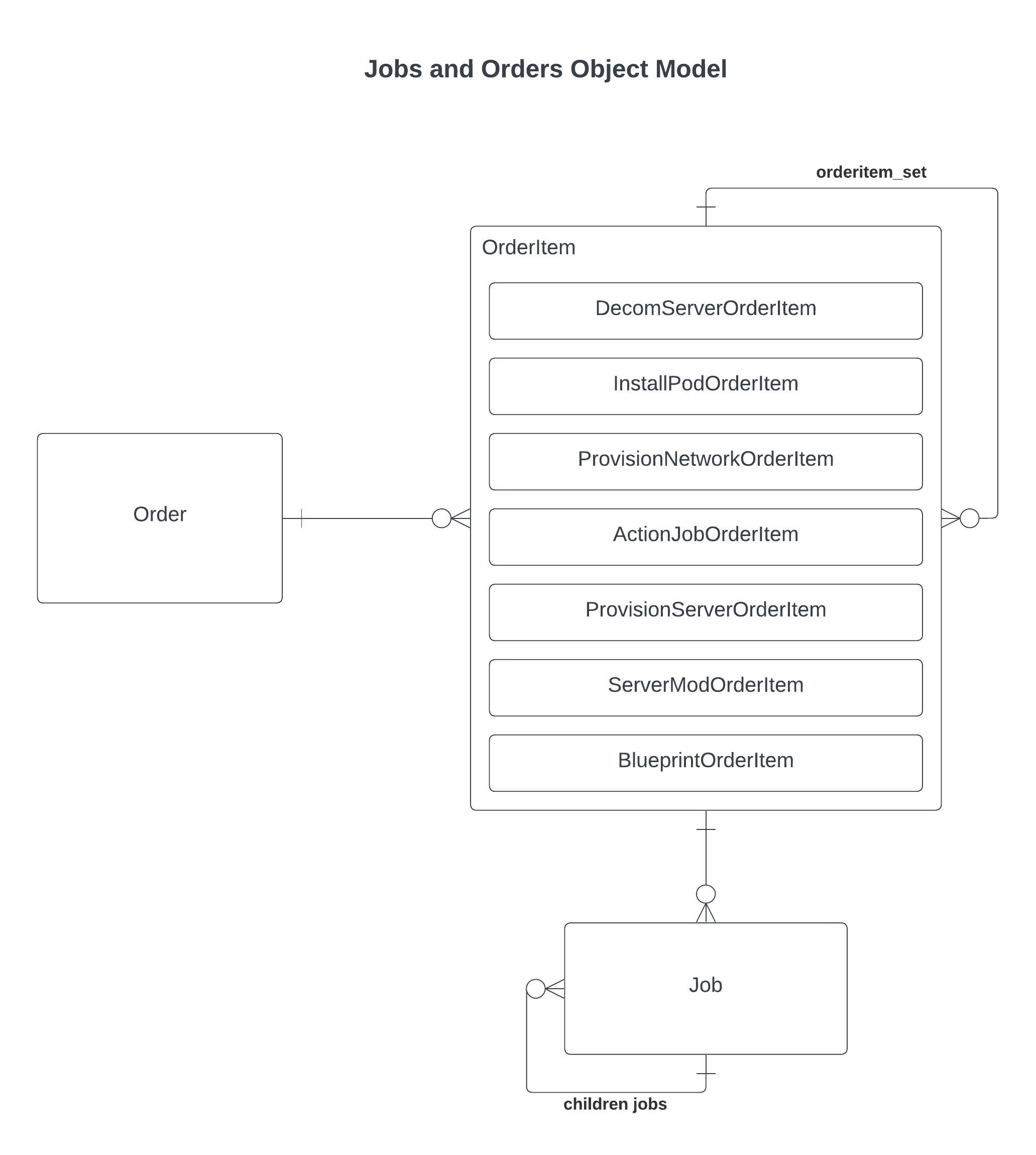
An orders.models.Order holds one or more OrderItem records, one per requested item. When the order is approved, Cloud Management Platform creates a jobs.models.Job for each top-level item, and those jobs can create sub-jobs.
 (opens full-size image in a new tab)
Order lifecycle
An order’s state is the Order.status field. It starts at CART, and only an order still in the cart can be submitted.
stateDiagram-v2
CART --> PENDING: Submit
PENDING --> ACTIVE: Approve
PENDING --> DENIED: Deny
PENDING --> CANCELED: Cancel
ACTIVE --> FCTLPAUSED: Held by flow control
FCTLPAUSED --> ACTIVE: Released
ACTIVE --> SUCCESS
ACTIVE --> WARNING
ACTIVE --> FAILURE
Every submitted order passes through PENDING, including those approved automatically. The final state reflects the jobs: WARNING if one finished with warnings, FAILURE if one failed or was canceled.
Once approved, ACTIVE is set before any work is arranged, and from there:
- The Post-Order Approval action runs first. If it fails, the order goes to
FAILURE. If it moves the order back toPENDING,DENIED, orCANCELED, approval stops there and creates no jobs. - Next, if the flow control feature is active and a rule holds the order back, it moves to
FCTLPAUSED, shown as Flow Control Paused, and no jobs are created. Releasing it creates the jobs and returns the order toACTIVE. - Otherwise the jobs are created. An order that ends up with none is completed as
SUCCESSimmediately.
Job lifecycle
A job’s state is the Job.status field. See the status table on Job engine for status details.
stateDiagram-v2
INIT --> PENDING
PENDING --> QUEUED
QUEUED --> PENDING: Not claimed
QUEUED --> RUNNING
RUNNING --> PAUSED
PAUSED --> RUNNING
RUNNING --> SUCCESS
RUNNING --> WARNING
RUNNING --> FAILURE
RUNNING --> TO_CANCEL: Cancel or timeout
TO_CANCEL --> CANCELED
A job in INIT has been created but is not ready to run. The job engine leaves it alone until set to PENDING. A pending job is claimed once its prerequisite finishes or its scheduled time arrives.
QUEUED means a worker has claimed the job. A queued job that was never run is rolled back to PENDING so another job engine process can pick it up.
PAUSED can occur when a plugin needs a manual step or because someone is tracing it. Resuming offers a choice of how to continue. STEP, NEXT, and RETURN are the debugger’s stepping modes, reached from a pause rather than on their own. See Resources for writing plugins.
A job can be canceled at any point before it finishes. Canceling marks the job and every unfinished job beneath it as TO_CANCEL. The job engine ends the work and moves each one to CANCELED. A job that exceeds its timeout takes the same route.
A rerun creates a new job and links it from the original’s rerun_job field. A job can be rerun once, and only from FAILURE unless the person rerunning it is a CloudBolt admin.
Related
- Job engine: What each status means, how workers pick up jobs, and job types.
- Deployment trigger points: Where these lifecycles let your own code run.
- Resources for writing plugins: Step through a plugin as it runs as a job.