Inbound webhooks
3 minute read
An inbound webhook adds a URL to the CMP API that runs a plugin you write. It also offers a simpler authentication option, which makes CMP easier to call from external systems.
To have CMP call an external API instead, see Outbound webhooks.
Why use inbound webhooks
You may want another system to call into the CMP API to fetch information or perform an action: a chatbot that reports how many VMs and public cloud accounts CMP manages, for example, or one that kicks off provisioning of a development environment when someone asks for it.
Inbound webhooks run synchronously. The API call does not return until the plugin has finished, and the results come back in the response to the original request. That keeps basic integrations simple, because the caller does not have to take a job ID and poll CMP until the work is done.
For longer-running work, write the plugin to start a job and return its ID instead.
Authorization
By default, any user authenticated with either the default authentication method or a token can execute any inbound webhook.
To restrict one to particular users, groups, or permissions, add that check to the plugin itself and return a permission-denied error when the caller is not authorized.
Create an inbound webhook
-
Log in with administrator credentials and go to Admin > Inbound Web Hooks.
-
Select Add, then Create New.
-
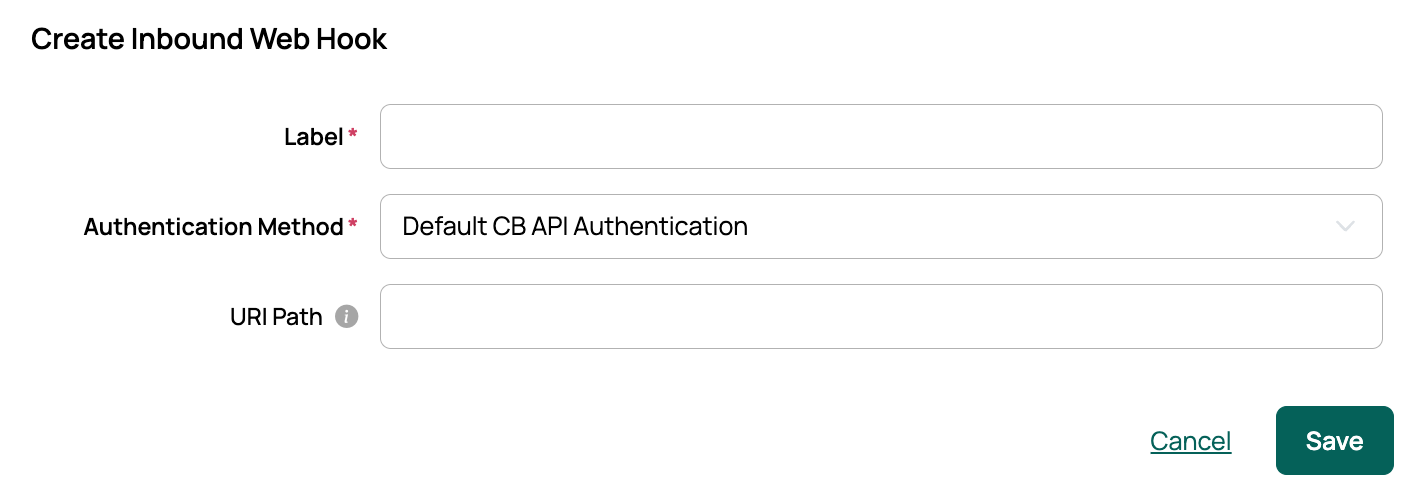
Enter a name in Label.
-
Choose an Authentication Method:
- Default CB API Authentication uses the standard CMP API authentication system.
- Token-based suits webhooks that need a lighter-weight process. It uses a unique token, which you pass in the URL for GET requests and in the JSON payload for POST requests.
-
Optionally set a URI Path. This is appended to the base URL to form the webhook’s full address. If you leave it empty, CMP uses the webhook’s global ID, which begins with
IWH. -
Select Save. The webhook is created with working sample code showing the signatures of the two methods you can expose:
inbound_web_hook_get()andinbound_web_hook_post(). -
Select the new webhook to view and edit its code.
Sample inbound webhook
This sample, Get CloudBolt Stats, serves calls from a chatbot or other service that wants high-level information about what the instance manages. It returns counts of servers, resources, users, resource handlers, and more.
from accounts.models import UserProfile, Group
from cbhooks.models import OrchestrationHook
from infrastructure.models import Environment, Server
from orders.models import Order
from resourcehandlers.models import ResourceHandler
from resources.models import Resource
from servicecatalog.models import ServiceBlueprint

def inbound_web_hook_get(*args, **kwargs):
    stats = dict()
    stats["blueprints"] = ServiceBlueprint.objects.count()
    stats["users"] = UserProfile.objects.count()
    stats["groups"] = Group.objects.count()
    stats["resource handlers"] = ResourceHandler.objects.count()
    stats["environments"] = Environment.objects.count()
    stats["actions"] = OrchestrationHook.objects.count()
    stats["orders"] = Order.objects.count()
    stats["servers"] = Server.objects.count()
    stats["resources"] = Resource.objects.count()
    return(stats)
Set a custom return value
To control the response, return iwh_status_code and iwh_embedded_response from the webhook code. The example below returns HTTP 201 on GET calls.
from common.methods import set_progress

def inbound_web_hook_get(*args, parameters=None, **kwargs):
    set_progress(f"This message will show up in CloudBolt's application.log. args: {args}, kwargs: {kwargs}, parameters: {parameters}")
    return({
        "iwh_status_code": 201,
        "iwh_embedded_response": {
            "message":"Successfully executed the GET method of this inbound web hook",
            "example return info": 147,
            "GET parameters passed in": parameters
        }
    })