VMware data collector configuration
9 minute read
The collector is deployed with CMP and does not require a CSMP license to run.
The collector can be configured in one of two ways:
- If you are a CMP-licensed customer, then configuration can be done using the standard CMP Administration UI.
- If you only have a CSMP license, deploy the CMP appliance in Collector mode and use management commands.
CMP also collects OpenStack inventory through an OpenStack Data Collector recurring job and an openstack sub-command. This page covers the VMware collector.
Installation and configuration guide
Installation
Install the appliance as usual by deploying the OVA or running the installer, then complete its network configuration. See Install Cloud Management Platform.
If you are a CSMP-only customer without a CMP license, you will need to set the appliance mode to “CSMP Collector.”
To set the appliance to CSMP Collector mode and the time zone:
-
Add the following to the
/var/opt/cloudbolt/proserv/customer_settings.pyfile.CSMP_DATA_COLLECTOR_ENABLED=True TIME_ZONE = 'America/New_York' -
Execute the following command to create the required base objects.
/opt/cloudbolt/initialize/create_objects.py /opt/cloudbolt/initialize/cb_minimal.py -
Restart the Job Engine.
supervisorctl restart jobengine:*
Configure the collector
To set up the data collector:
- In the CSMP tenant, configure one VMware adaptor and configure the VMware rate card.
- Configure one Connection Info named CSMP Data Collector with your CSMP Domain URL and CSMP API Key. The collector looks for that exact name and uploads nothing to CSMP without it.
- Configure one or more resource handlers in CMP for the CSMP adaptors to collect data from.
- For each resource handler, create a recurring job from the CSMP VMware Data Collector action, scheduled to run every 30 minutes. The
collector_config vmware createcommand below does this for you.
This collector supports a proxy server. The resource handler’s service account must have the built-in Read-Only role and Storage Profile permissions to collect data successfully.
Set up with the collector_config command
If you are a CSMP-only customer, you can configure the above steps using the collector_config management command.
-
To create the CSMP Data Collector Connection Info with your CSMP Domain URL and CSMP API Key, run this command:
/opt/cloudbolt/manage.py collector_config csmp create --domain-url https://mycsmp.cloudbolt.app --api-key yourapikeyFetch the VMware adapter key from the CSMP portal as follows:
-
Log in to the CSMP portal, for example
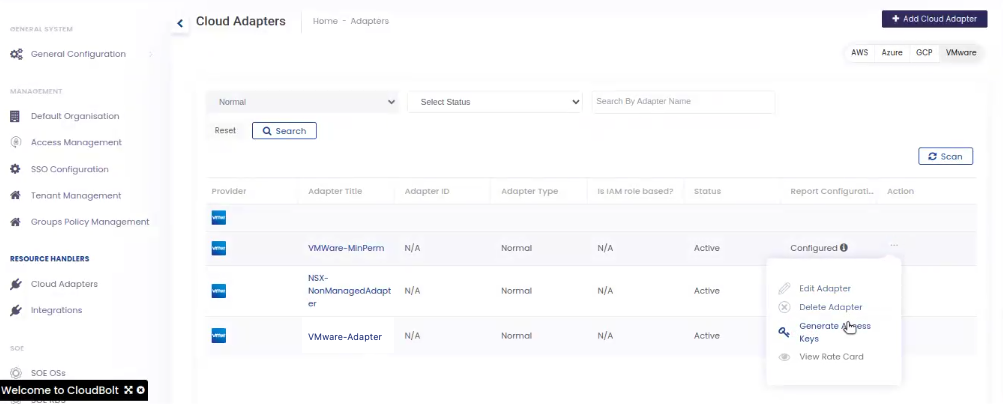
https://abcxys.cloudbolt.app/, and go to VMware Adapters. -
Generate the Access key for the specific VMware Adapter as shown in the following screenshot:
-
Select Generate Access Keys to generate the required API key.
-
-
To configure resource handlers in CMP, run this command:
/opt/cloudbolt/manage.py collector_config vmware create --host myvcenter.cloudbolt.com --username yourvcenteruser --password yourvcenterpassword
That command takes the same arguments as the vmware sub-command’s create operation.
The vmware create command also creates the resource handler’s recurring job. To confirm it exists, run this command:
/opt/cloudbolt/manage.py collector_config recurring-job list
Sample Output
+--------------+--------------------------------------------------------------------+---------+----------------------+
|      ID      |                                Name                                | Enabled |       Last Run       |
+--------------+--------------------------------------------------------------------+---------+----------------------+
| RJB-374fv8ip | CSMP VMware Data Collector - vcenter2-csmp.cblabqa.net-RH-ly17mzoa |   True  | 01-Apr-2024 18:30:00 |
+--------------+--------------------------------------------------------------------+---------+----------------------+
collector_config command reference
The section below describes how to use the collector_config management command.
The collector_config management command configures the VMware data collector. It is intended for appliances running in collector mode.
Positional arguments
| Argument | Description | Required |
|---|---|---|
| sub command | Available Sub Commands: csmp vmware recurring-job proxy openstack setup cb-platform-client |
Y |
| operation | Sub-command operation: specific to each sub-command, described in the sections below. | Y |
Sub-commands
The collector_config command contains the following sub-commands.
Most operations act on one configuration and take --config-id to identify it. Get the ID from that sub-command’s list operation.
csmp
The csmp command is used to manage the CSMP VMware Data Collector configuration.
create
Create the CSMP Data Collector Connection Info that the collector uploads to. Only one can exist.
| Argument | Description | Required |
|---|---|---|
| –domain-url | CSMP domain URL | Y |
| –api-key | CSMP API Key: if not specified, the user will be prompted for it. | N |
| –skip-verify | Include this to skip CSMP connection verification. | N |
Sample Usage
/opt/cloudbolt/manage.py collector_config csmp create --domain-url https://mycsmp.cloudbolt.app --api-key yourapikey
list
List VMware Data Collector configurations; requires no command-line arguments.
Sample Usage
/opt/cloudbolt/manage.py collector_config csmp list
Sample Output
+--------------+------------------------------+
|      ID      |       CSMP Domain URL        |
+--------------+------------------------------+
| CON-xfxnxbat | https://mycsmp.cloudbolt.app |
+--------------+------------------------------+
update-apikey
Update a CSMP API Key.
| Argument | Description | Required |
|---|---|---|
| –config-id | The ID of the config you want to change the API Key for. This can be obtained by using the list operation for this command. | Y |
| –api-key | CSMP API Key: if not specified, the user will be prompted for it. | N |
Sample Usage
/opt/cloudbolt/manage.py collector_config csmp update-apikey --config-id CON-xfxnxbat --api-key yournewapikey
remove
Remove a VMware Data Collector configuration.
Sample Usage
/opt/cloudbolt/manage.py collector_config csmp remove --config-id CON-xfxnxbat
recurring-job
The recurring-job command is used to get information about “CSMP VMware Data Collector” jobs
list
List all VMware Data Collector recurring jobs.
Sample Usage
/opt/cloudbolt/manage.py collector_config recurring-job list
create
Create a VMware Data Collector recurring job for a VMware configuration. vmware create already creates one, so use this only to replace a job that was removed.
Sample Usage
/opt/cloudbolt/manage.py collector_config recurring-job create --config-id RH-ly17mzoa
update
Update information about recurring jobs, such as dry_run, interval_time, schedule, and max_retries. Provide --config-id and at least one of the other options.
| Argument | Description | Required |
|---|---|---|
| –config-id | The ID of the Recurring Job config that the job run belongs to. This can be obtained by using the list operation for this command. | Y |
| –max-retries | Specify the maximum number of retries for the recurring job | N |
| –interval-time | Specify the retry interval (in seconds). | N |
| –schedule | Specify the schedule for the recurring job (for example, 0 1 * * *) |
N |
| –dry-run | Whether to run the recurring job in dry-run mode, without executing any actions: yes or no. |
N |
Sample Usage
/opt/cloudbolt/manage.py collector_config recurring-job update --config-id RJB-702701o7 --max-retries 2 --interval-time 180
enable
Enable a VMware Data Collector Recurring Job.
Sample Usage
/opt/cloudbolt/manage.py collector_config recurring-job enable --config-id RJB-702701o7
disable
Disable a VMware Data Collector Recurring Job.
Sample Usage
/opt/cloudbolt/manage.py collector_config recurring-job disable --config-id RJB-702701o7
remove
Remove a VMware Data Collector Recurring Job.
Sample Usage
/opt/cloudbolt/manage.py collector_config recurring-job remove --config-id RJB-702701o7
run-now
Manually initiate a VMware Data Collector Job
Sample Usage
/opt/cloudbolt/manage.py collector_config recurring-job run-now --config-id RJB-702701o7
list-jobs
List the summary of the last 50 jobs (or --display-limit) for a CSMP VMware Data Collector, including start and end dates, and status.
| Argument | Description | Required |
|---|---|---|
| –config-id | The ID of the Recurring Job config you want to list jobs for. This can be obtained by using the list operation for this command. | Y |
| –job-status | Optional: list jobs by job status. | N |
| –start-date | Optional: list jobs by start date in DD-Mon-YYYY format. | N |
| –end-date | Optional: list jobs by end date in DD-Mon-YYYY format. | N |
| –display-limit | Optional: specify the number of jobs to list; defaults to the 50 most recent. | N |
Sample Usage
/opt/cloudbolt/manage.py collector_config recurring-job list-jobs --config-id RJB-702701o7
Sample Output
+--------------+----------------------+----------------------+---------+-------------------------------+
|      ID      |      Start Date      |       End Date       |  Status |            Log File           |
+--------------+----------------------+----------------------+---------+-------------------------------+
| JOB-xb855j0c | 26-Mar-2024 18:43:07 | 26-Mar-2024 18:55:28 | SUCCESS | /var/log/cloudbolt/jobs/3.log |
| JOB-judyl6e4 | 26-Mar-2024 18:40:09 | 26-Mar-2024 18:40:11 | FAILURE | /var/log/cloudbolt/jobs/4.log |
| JOB-mqk7p29f | 25-Mar-2024 21:01:25 | 25-Mar-2024 21:03:01 | SUCCESS | /var/log/cloudbolt/jobs/5.log |
+--------------+----------------------+----------------------+---------+-------------------------------+
get-job
Get information about job runs, including start and end dates, and status.
| Argument | Description | Required |
|---|---|---|
| –config-id | The ID of the Recurring Job config you want to list jobs for. This can be obtained by using the list operation for this command. | Y |
| –job-id | The ID of the job you want to view. This can be obtained by using the list operation. | Y |
Sample Usage
/opt/cloudbolt/manage.py collector_config recurring-job get-job --config-id RJB-702701o7 --job-id JOB-21nnojnu
vmware
The VMware command is used to manage one or more VMware Resource configurations.
create
Create VMware configurations.
| Argument | Description | Required |
|---|---|---|
| –host | vCenter Hostname or IP address. | Y |
| –port | vCenter Port; defaults to 443. | N |
| –username | vCenter Username. | Y |
| –skip-ssl | Include this to skip SSL certificate verification when making vCenter API calls; defaults to False when not included on the command line. | N |
| –password | vCenter Password: if not specified, the user will be prompted for it. | N |
| –skip-verify | Include this to skip VMware connection verification. | N |
list
List VMware resource configurations; requires no command-line arguments
Sample Usage
/opt/cloudbolt/manage.py collector_config vmware list
update-password
Update your vCenter password
| Argument | Description | Required |
|---|---|---|
| –config-id | The ID of the config you want to change the password for. This can be obtained by using the list operation for this command. | Y |
| –password | vCenter Password; if not specified, the user will be prompted for it. | N |
Sample Usage
/opt/cloudbolt/manage.py collector_config vmware update-password --config-id RH-mzk1bw32 --password yournewvcenterpassword
remove
Remove VMware Resource configuration.
Sample Usage
/opt/cloudbolt/manage.py collector_config vmware remove --config-id RH-mzk1bw32
proxy
Manage proxy server settings.
create
Configure a proxy server.
| Argument | Description | Required |
|---|---|---|
| –host | The proxy server IP or hostname | Y |
| –protocol | The proxy server protocol: if not specified, a proxy is set up for HTTP and HTTPS | N |
| –port | The proxy server protocol port; defaults to 443. | N |
| –username | The proxy server username | N |
| –password | The proxy server password | N |
| –bypass-proxy-domains | A comma-separated list of the domains for which CMP should not attempt to use a proxy server to route the connections. These domain names are regular expressions and could also be represented as IPv4 IP addresses. For example, '.*\.internal\.loc,192\.168\..*,my\.domain\.com'. |
N |
Sample Usage
/opt/cloudbolt/manage.py collector_config proxy create --host myproxy.mydomain.net --port 3128 --protocol http --bypass-proxy-domains ".*\.mydomain\.net,.*\.mydomain2\.net"
list
List proxy servers
Sample Usage
/opt/cloudbolt/manage.py collector_config proxy list
update-proxy-bypass
Update proxy bypass rules.
| Argument | Description | Required |
|---|---|---|
| –bypass-proxy-domains | A comma-separated list of the domains for which CMP should not attempt to use a proxy server to route the connections. These domain names are regular expressions and could also be represented as IPv4 IP addresses. For example, '.*\.internal\.loc,192\.168\..*,my\.domain\.com'. If not specified, all bypass rules are removed. |
N |
Sample Usage
/opt/cloudbolt/manage.py collector_config proxy update-proxy-bypass --bypass-proxy-domains ".*\.mydomain\.net,.*\.mydomain2\.net"
remove
Remove proxy server configuration.
Sample Usage
/opt/cloudbolt/manage.py collector_config proxy remove
verify-domain
Verify whether a request for a domain will be routed through the proxy or bypassed.
| Argument | Description | Required |
|---|---|---|
| –request-domain | The request domain to verify whether requests for this domain will be routed through the proxy. | Y |
Sample Usage
/opt/cloudbolt/manage.py collector_config proxy verify-domain --request-domain google.com
Recurring job: Agent - Resend Processed Queue Files
The Agent - Resend Processed Queue Files recurring job resends processed ZIP files to the CSMP endpoint if the CSMP host is unreachable. It is created disabled; enable it with collector_config recurring-job enable. Additionally, the management commands listed below can be used to manually run the Agent - Resend Processed Queue Files job.
run-now
Manually run the Agent - Resend Processed Queue Files job.
Sample Usage
/opt/cloudbolt/manage.py collector_config recurring-job run-now --config-id RJB-702701o7
Output
Successfully initiated Agent - Resend Processed Queue Files job, Job ID: JOB-12wb0q4o
enable
Enable the Agent - Resend Processed Queue Files recurring job.
Sample Usage
/opt/cloudbolt/manage.py collector_config recurring-job enable --config-id RJB-702701o7
disable
Disable the Agent - Resend Processed Queue Files recurring job.
Sample Usage
/opt/cloudbolt/manage.py collector_config recurring-job disable --config-id RJB-702701o7
remove
Remove the Agent - Resend Processed Queue Files recurring job.
Sample Usage
/opt/cloudbolt/manage.py collector_config recurring-job remove --config-id RJB-702701o7
If the job is missing
If the Agent - Resend Processed Queue Files job is not listed when you run this command:
/opt/cloudbolt/manage.py collector_config recurring-job list
Create it with this command:
/opt/cloudbolt/manage.py collector_config setup initialize