Deployment trigger points
6 minute read
An action attached to a blueprint runs only for that blueprint. The same action attached to a trigger point runs for every order or every server provisioned, which is ideal for policy, naming, validation, and notifications. This topic covers the trigger points a deployment passes through and what each one receives.
Where the trigger points fall
Deploying a blueprint that contains a single server runs two jobs: a Deploy Blueprint job that processes the order and a Provision Server job that builds the server, each with its own trigger points. Actions can also be triggered on order status changes. See Orchestration actions for the full list of trigger points.
Deploy Blueprint job
This job has two order-related trigger points. The last three columns in the following table contain the keyword arguments passed to your plugin’s run method; see Structure of a plugin.
| Trigger point | Runs in | Logs to | job |
order |
hook_point |
|---|---|---|---|---|---|
| Post-Order Approval | Web server | application.log |
None |
Order |
pre_order_execution |
| Post-Order Execution | Job engine | The Deploy Blueprint job’s log | None |
Order |
post_order_execution |
Both trigger points receive a logger of type ThreadLogger.
Post-Order Approval
This trigger point is named Post-Order Approval, but its hook_point value is pre_order_execution. It runs immediately after an order is approved and before any jobs are created. It runs on order approval, including automatic approvals.
Because it runs on the web server rather than the job engine, its output goes to application.log. In a high availability deployment, this is the log on the web server that handled the request, under /var/log/cloudbolt/.
Provision Server job
These trigger points all run in the job engine, log to the job’s log, and are listed below in execution order.
A server object exists from early in the job and becomes more complete as it progresses. At Pre-Create Resource, the server is still a stub you can modify before the resource handler creates it; after creation, it carries details including its IP address.
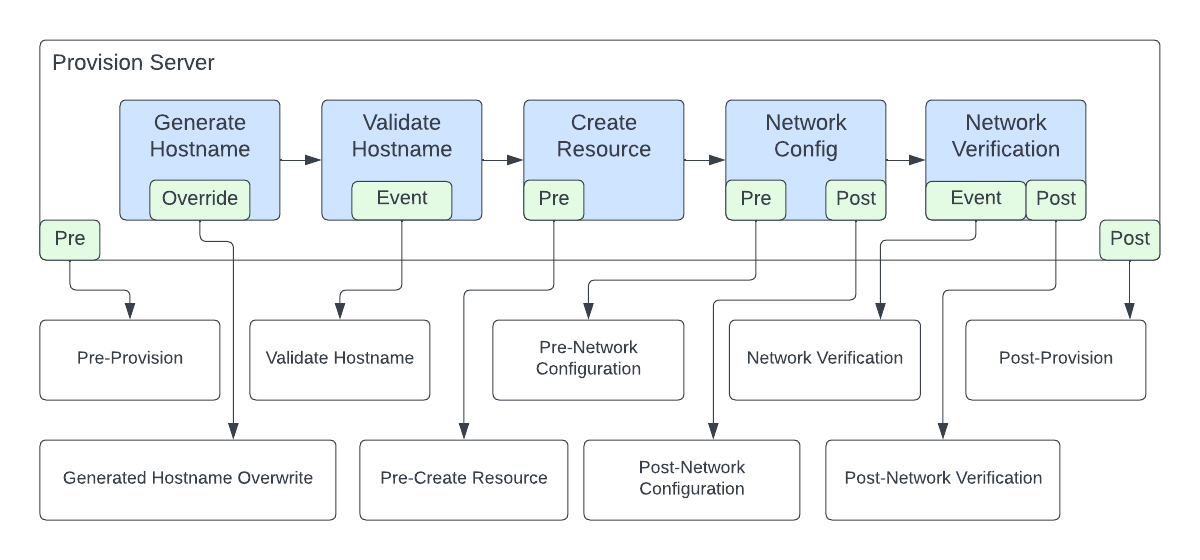 (opens full-size image in a new tab)
| Trigger point | hook_point |
Also receives |
|---|---|---|
| Pre-Provision | pre_provision |
No server yet |
| Generated Hostname Overwrite | generated_hostname_overwrite |
server, servers |
| Validate Hostname | validate_hostname |
server, servers |
| Pre-Create Resource | pre_create_resource |
server, servers |
| Pre-Network Configuration | pre_networkconfig |
server, servers |
| Post-Network Configuration | post_networkconfig |
server, servers |
| Network Verification | network_verification |
server, servers, and nic, a ServerNetworkCard |
| Post-Network Verification | post_network_verification |
server, servers |
| Post-Provision | post_provision |
server, servers |
They all also receive logger and job. Where servers appears it is a list containing one server.
A plugin that reports where it ran
Attach this to any trigger point to see what its kwargs contain.
from common.methods import set_progress

def run(job, *args, **kwargs):
    hook_point = kwargs.get('hook_point', '')
    set_progress("Running at hook_point={} and job.id={}".format(hook_point, job.id))

    server = kwargs.get('server')
    if server:
        set_progress("This plug-in is running for server {}".format(server))

    set_progress("Dictionary of keyword args passed to this plug-in: {}".format(kwargs.items()))

    return "SUCCESS", "Sample output message", ""
Reusing a blueprint’s action everywhere
An action created in a blueprint’s build phase is added to the global actions list and referenced from that blueprint. To apply the same logic everywhere, make it a shared plugin and attach it to the relevant trigger point: changes then take effect wherever it is referenced, leaving one copy to maintain rather than one per blueprint.
Notification trigger points
Two trigger points customize notifications. For both, returning FAILURE or raising an unhandled exception does not change the order’s status.
Order Approval Notification
This replaces the notification approvers get when an order is submitted. It does not run if:
- An Order Approval action is enabled, since approval is then handled outside Cloud Management Platform’s default process.
- The order is approved automatically, because there is nobody to notify.
You can define more than one, but each will send its own notification. Use execution filters to control which one runs in a given context.
Example
This walks the order to build a summary of what was requested, including blueprint parameters, the build item’s arguments, and any preconfiguration values.
def order_approval_notification(order, request, *args, **kwargs):
    try:
        # The top-level order item carries the blueprint-level parameters.
        boi = order.orderitem_set.get(parent_order_item=None).cast()
    except Exception as e:
        return "FAILURE", "Could not find the order's top-level item", e

    parts = []

    # Blueprint parameters whose destination includes the resource live on the
    # order item; those targeting build items live on each item's arguments.
    for cfv in boi.custom_field_values.all():
        parts.append(f"{cfv.field.name}: {cfv.value}")

    bia = boi.blueprintitemarguments_set.first()
    if bia:
        try:
            parts.append(f"quantity: {bia.quantity}")
            parts.append(f"environment: {bia.environment.name}")
            parts.append(f"os_build: {bia.os_build.name}")
        except AttributeError:
            # This order may not contain a server tier.
            pass

        for cfv in bia.custom_field_values.all():
            parts.append(f"{cfv.field.name}: {cfv.value}")

        for pcvs in bia.preconfiguration_values.all():
            parts.append(f"preconfiguration: {pcvs.preconfiguration.name}")
            for cfv in pcvs.custom_field_values.all():
                parts.append(f"    {cfv.field.name}: {cfv.value}")

    return "SUCCESS", "; ".join(parts), ""
What it receives
| Argument | What it is |
|---|---|
order |
The order, from which you can reach the blueprint as order.blueprint, the environment as order.environment where one applies, and the order’s items. |
request |
The HTTP request from the person who placed the order. |
What to return
Return a tuple of status, message, and error. They decide what is logged and what the user sees.
| Position | What to put there |
|---|---|
| status | One of SUCCESS, INFO, WARNING, or FAILURE. It sets both the log level and the color of the message shown to the user. |
| message | The text to log and show. Leave it empty: nothing is logged, and no message appears. |
| error | A string or a Python exception. Pass the exception, and its traceback is logged too. |
SUCCESS and INFO both log at INFO, shown green and blue; WARNING logs a warning, shown orange; FAILURE logs an error, shown red.
Post-Order Execution Notification
This runs after the Post-Order Execution actions have finished, and takes only order. Its return tuple works as above, except that there is no user request to show a message to, so the status and message reach only the logs.
As with approval notifications, you can define several, and each will fire. Consider using execution filters.
Example
This example deliberately calls a function that does not exist, to show how returning an exception affects the logs.
def post_order_execution_notification(order, *args, **kwargs):
    msg = ""
    try:
        # This function does not exist, so this raises an exception.
        return_value = some_function_that_doesnt_exist()
    except Exception as e:
        msg = "Error running some_function_that_doesnt_exist()"
        # Returning the exception logs its traceback as an error.
        return "FAILURE", msg, e

    return "SUCCESS", msg, ""
Related
- Orchestration actions: Every trigger point and how to attach an action.
- Orders and jobs: Order and job lifecycles where the trigger points reside.
- Structure of a plugin: The
runmethod, and what to do with what it receives.