Module credentials
Create and manage encrypted, reusable credentials for OneFuse module endpoints
3 minute read
Module Credentials are encrypted and reusable across OneFuse Module Endpoints of the same Endpoint Type.
A Module Credential is a prerequisite to creating Module endpoints and OneFuse Policies.
| Workspace role | Function(s) |
|---|---|
| Admin or Member | Create, update, view and delete Module Credentials |
| Viewer | View Module Credentials |
Modules list
The following modules utilize Module Credentials:
- Ansible Tower
- DNS
- IPAM
- Microsoft AD
- Naming (when using Validators)
- Scripting
- ServiceNow CMDB
- ServiceNow Connector
- VMware Aria Automation
Access Module Credentials
- Log in to the OneFuse UI.
- In the Workspace, select Module Credentials from the left navigation menu.
This area will display all active Module Credentials by Endpoint Type.
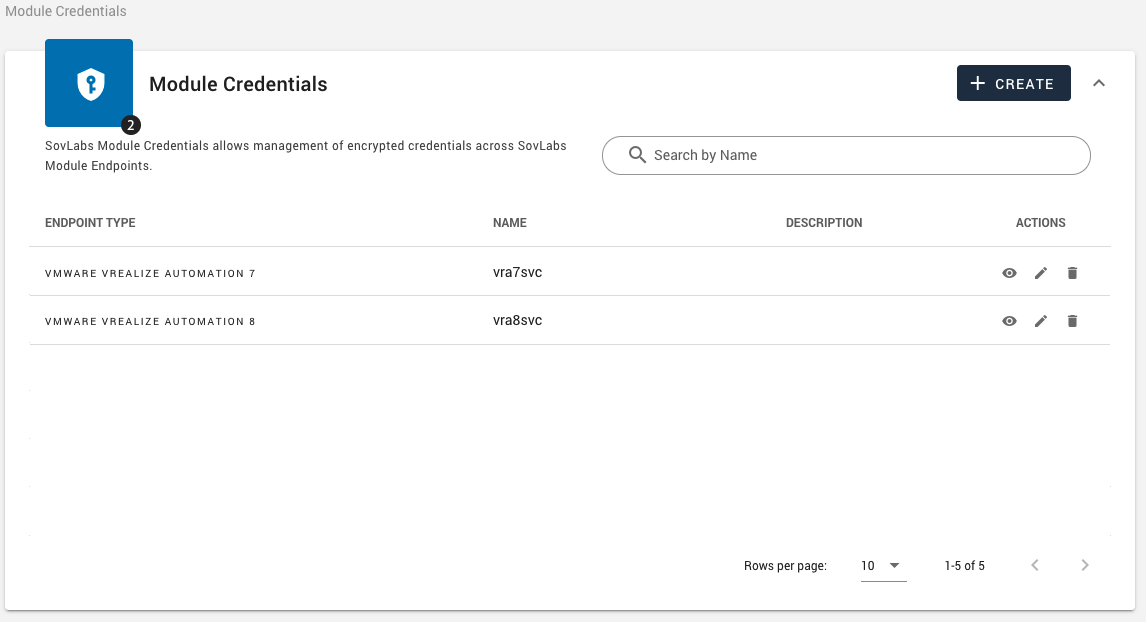 (opens full-size image in a new tab)
Perform the following from the Actions column:
| Action | Workspace role(s) |
|---|---|
| View | Admins, Members, or Viewers |
| Edit | Admins or Members |
| Delete | Admins or Members |
Manage Module Credentials
Module Credential form
| Field | Description |
|---|---|
| Module Credential Name | This must be at least three (3) alphanumeric characters/underscores and cannot include spaces nor dashes. |
| Description | Optional description for this credential. Shows on the Module Credential dashboard. |
| Endpoint Type | Select an Endpoint Type from the dropdown. The Endpoint Types listed here require Credentials in order to connect. |
| Username/Password | Enter the username and password associated to the Endpoint Type account (for example, the VMware Aria Automation 8 account). |
| Refresh Token | Enter the Refresh Token associated to the Endpoint Type account (for example, the VMware Aria Automation Cloud 8 account). |
Create a credential
- Access Module Credentials.
- From the Module Credentials datatable, select [+ Create].
- Enter the field values on the Module Credential form and select Create.
- Use this Credential for Module Endpoint(s).
| Endpoint type | Username format |
|---|---|
| Ansible Tower | Username only (for example, admin) |
| BlueCat | UPN (user@domain) or LDAP depending on configuration |
| Infoblox | UPN (user@domain) |
| Men&Mice Micetro | UPN (user@domain) or AD credentials if connected to AD |
| Microsoft | UPN (user@domain) |
| ServiceNow | UPN (user@domain) |
| SolarWinds | Username only (for example, admin) |
| Target Host (for Scripting Module) | Admin determined credentials, not subject to specific format |
| VMware vRealize Automation 7 | Username only (for example, admin) |
| VMware Aria Automation 8 | Username only (for example, admin) |
Update a credential
Update a Module Credential to change the Credential Name, Description, Username, and either Update the Password or Keep the existing password.
- Access Module Credentials.
- Find the Module Credential to update and select the edit icon.
- Edit the information on the Module Credential form.
- Select Update.
- To change the password, first select the Update Password toggle. Enter a new password.
Delete a credential
Module Credentials cannot be deleted if they are tied to a Module Endpoint.
- Access Module Credentials.
- Find the Module Credential and select the delete icon.
- Select [Delete] to confirm.