Naming components
9 minute read
The following components are needed to generate names.
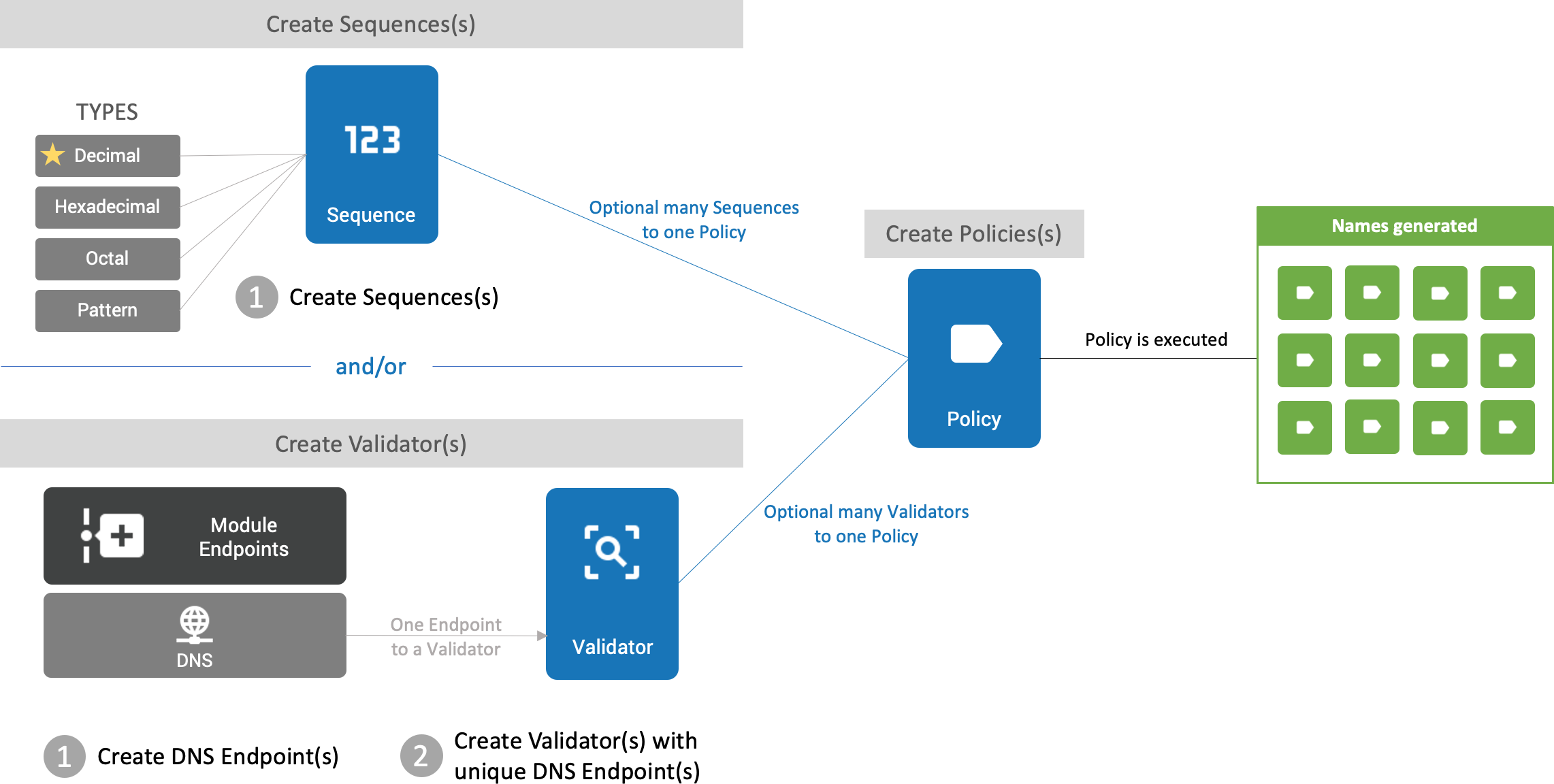 (opens full-size image in a new tab)
Sequences
A Sequence allows for a continuous or connected series of numbers to be used when generating a name.
Sequence types
Decimal
Base10 numeral system. Increments a sequence 0 to 9.
The most commonly used Sequence Type.
{# Example Decimal Sequence with:
   Reuse Sequence Values: false
   Maximum Length: 2
   Padding Character: 0
   Initial Value: 1
   No Unique Key
#}

=> 01, 02, 03, 04, 05, 06, 07, 08, 09, 10, 11 ... 99
Consume odd or even sequenced custom names by passing the following OneFuse naming properties from the upstream provider:
| Property name | Property value |
|---|---|
OneFuse_Naming_EvenSequence |
'true' |
OneFuse_Naming_OddSequence |
'true' |
Hexadecimal
Base16 numeral system (binary representation). Increments with numbers 0 to 9 followed by letters A to F.
{# Example Hexadecimal Sequence with:
   Reuse Sequence Values: false
   Maximum Length: 2
   Padding Character: 0
   Initial Value: 1
   No Unique Key
#}

=> 01, 02, 03, 04, 05, 06, 07, 08, 09, 0A, 0B ...
Octal
Base8 numeral system (binary representation). Increments using digits 0 to 7.
{# Example Octal Sequence with:
   Reuse Sequence Values: false
   Maximum Length: 2
   Padding Character: 0
   Initial Value: 1
   No Unique Key
#}

=> 01, 02, 03, 04, 05, 06, 07, 10, 11 ...
Pattern
Mix of bases (Decimal, Hexadecimal, Octal, and so on) and static text. Define all Pattern Keys inside / /.
| Base name | Base range | Pattern key | Default value |
|---|---|---|---|
| Decimal | 0 to 9 | # |
0 |
| Hexadecimal | 0 to F | x |
0 |
| Octal | 0 to 7 | o |
0 |
| Binary | 0 to 1 | b |
0 |
| Alpha | a to z | a |
a |
{# Example 1 of Pattern with Alpha, Decimal and Binary #}

/a#b/

=> a00, a01, a10 ...


{# Example 2 of Pattern with Alpha, Static Text and Binary #}
/a/-mytext-/b/

=> a-mytext-0, a-mytext-1, b-mytext-0, b-mytext-1, c-mytext-0 ...
Sequence form fields
| Field label | Field name | Description |
|---|---|---|
| Name | name |
Friendly label or name for this Sequence. Only alphanumeric characters with underscores. |
| Description | description |
Optional description for this Sequence. |
| Sequence Type | type |
Select one of the following types: Decimal, Hexadecimal, Octal, or Pattern. Refer to Sequence types to learn more. |
| Reuse Sequence Values | reuse |
true to reuse a previous sequence if available, starting from Initial Value. false to get the next sequence, starting from Last Value. |
| Maximum Length | length |
Maximum length of the sequence. For example, if set to 2, a Decimal sequence will range from 01 to 99. |
| Padding Character | pad |
Character to pad the sequence when Maximum Length is not met. For example, with Maximum Length of 2 and padding of 0, the sequence pads as 01…09 until it reaches 10. |
| Pattern | patternFormat |
When Sequence Type is Pattern, enter the pattern using a mix of bases with optional static text. |
| Initial Value | initialValue |
Start value of the sequence. Decimal example: if set to 1, the sequence starts at 1 and increments. When Reuse Sequence Values is true, the sequence starts from this value each time. When false, it starts from this value initially then increments from the Last Value. |
| Unique Key (optional) | uniqueKey |
Optional but recommended. Defines which elements of the name are evaluated to determine when the sequence number should restart. |
| Unique Key Assigned Values: Key | namingData |
Populated automatically after a Unique Key is defined and the sequence is generated. You do not need to populate this field when creating a Sequence. Represents the unique combination of name elements that were evaluated. |
| Unique Key Assigned Values: Next Value | namingData |
Populated automatically. Represents the next sequence value for the Unique Key. |
| Last Value | lastValue |
Populated automatically after the sequence is generated. Shows the last sequence value generated. Read-only in the UI. |
| Next Value | currentValue |
Populated automatically. Indicates the next sequence value. Can be overridden when no Unique Key is defined. |
Create a decimal sequence with a unique key
A walkthrough of creating a commonly used Naming Sequence:
- Log in to the OneFuse UI.
- Go to the Naming dashboard: select Modules > Naming from the left navigation menu.
- Find the Naming Sequences datatable and select Create.
- Fill out the form:
- Naming Sequence Name: Friendly label for this Naming Sequence.
- Description: Optional description.
- Sequence Type: Decimal. The most common type of Sequence; increments the sequence numbers 0 to 9.
- Reuse Sequence Values:
false - Maximum Length:
3. Sequence range is 1 to 999. - Padding Character:
0. Prefixes zeros in front of numbers 1–9 (for example, 001 through 100, then 101 through 999). - Initial Value:
1. Sequence starts at 001. - Unique Key (Optional): Recommended. Define a Unique Key to increment sequencing independently when a unique combination of the name is evaluated. See Constructing a Unique Key for more details.
Delete a Naming Sequence
A Naming Sequence cannot be deleted if it is associated with an existing Naming Policy.
Constructing a Unique Key
The Unique Key is also a representation of the Naming Policy’s Naming Template field. Users define a Sequence Unique Key to increment sequencing independently when a unique combination of the name is evaluated. The example below uses Templating with Filters.
For this example, assume that the name is derived from three properties: Environment, OS, and Application. Based on the incoming values of those properties, the data may change, resulting in a unique combination that causes the sequence to increment from the Initial Value.
Example naming data:
{
  "Environment": "dev",
  "OS": "Linux",
  "Application": "Web Servers"
}
Example Unique Key:
{# Example Unique Key
  First lowercase letter from OS property
  First letter from Environment property
  First lowercase letter from Application property
  Static text of the word "test"
#}

{{ OS | first | lower }}{{ Environment | first | lower }}{{ Application | first | lower }}test
Example sequences generated from the above sample Unique Key result in the following:
{# Sequence 1: Environment: dev, OS: Linux, Application: Web Servers #}
=> ldwtest001

{# Sequence 2: same data, no change #}
=> ldwtest002

{# Sequence 3: Environment changed to prod; sequence restarts from 001 (new unique key) #}
=> lpwtest001
Example Unique Key assigned values (visible when viewing or updating the Sequence):
| Key | Next value |
|---|---|
| ldwtest | 3 |
| lpwtest | 2 |
Validators
When attached to a Naming Policy, the name generated is validated against each Validator to check for name uniqueness. A Naming Validator cannot be deleted when attached to a Naming Policy.
Validator types
Look forward to future releases, which will include more Naming Validator Types.
DNS Naming Validator
The most commonly used Naming Validator. Checks that the generated name does not resolve in the DNS (Domain Name System) server defined on the DNS Endpoint. If the name resolves (the name is already associated and is in use), a new name is generated.
VMware vRealize Automation 7 Naming Validator
Checks that the generated name does not resolve in the VMware vRealize Automation 7 server defined on the VMware vRealize Automation 7 Endpoint. If the name resolves (the name is already associated and is in use), a new name is generated.
VMware Aria Automation 8 Naming Validator
Checks that the generated name does not resolve in the VMware Aria Automation 8 server defined on the VMware Aria Automation 8 Endpoint or VMware Aria Automation Cloud Endpoint. If the name resolves (the name is already associated and is in use), a new name is generated.
Create a Naming Validator
- Log in to the OneFuse UI.
- Create an Endpoint for the desired Validator type if one does not exist.
- Select Modules > Naming from the left navigation menu.
- Find the Naming Validators datatable and select Create.
- Fill out the form:
- Naming Validator Name: Friendly label for this Naming Validator.
- Description (optional): Optional description.
- Validator Type: Select DNS, VMware vRealize Automation 7, VMware Aria Automation 8, or Aria Automation Cloud.
- Endpoint: Select the Endpoint for the chosen Validator type.
Generating a name with a Naming Validator
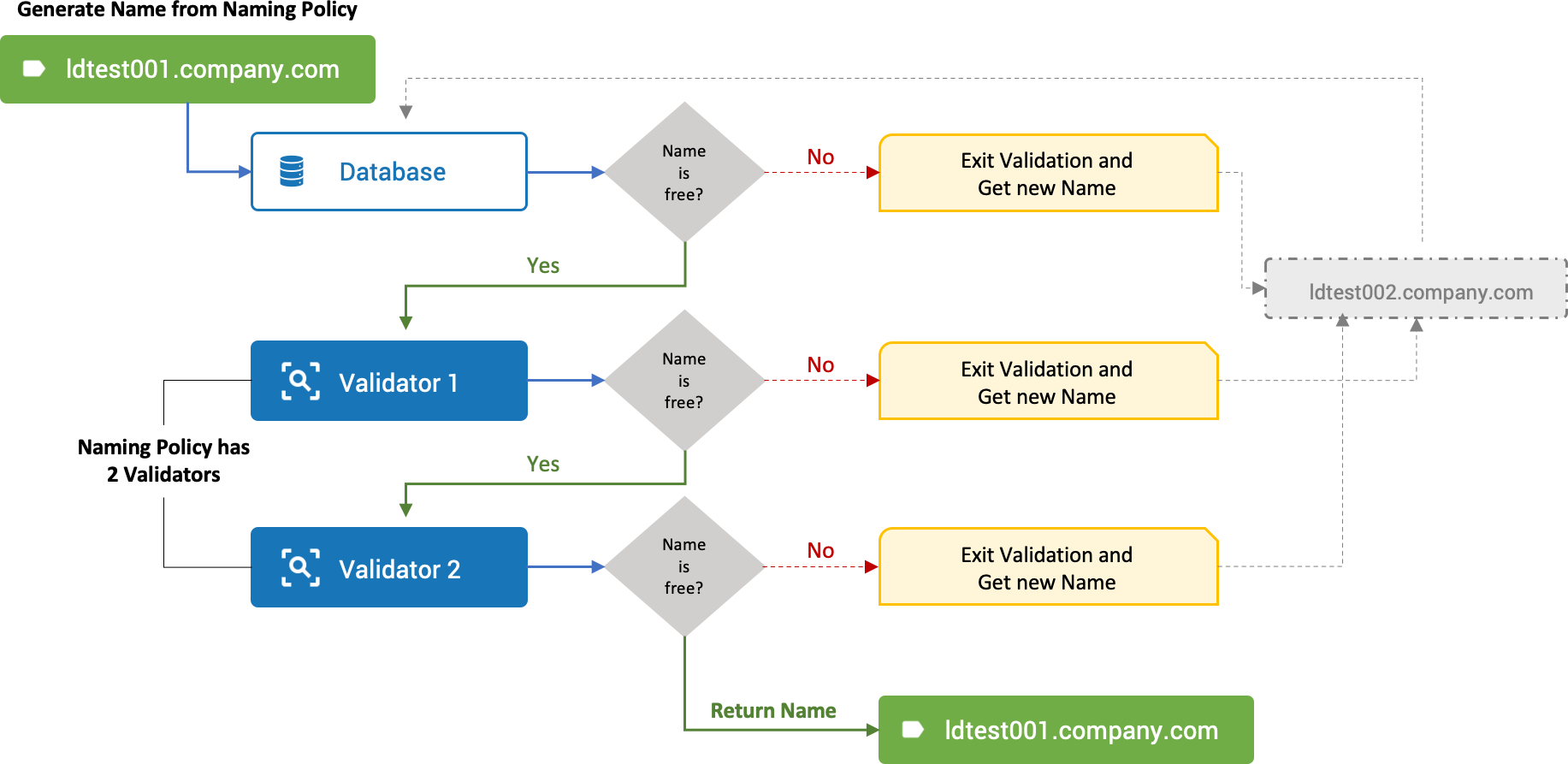
The following example uses a DNS Naming Validator. The same pattern applies to VMware vRealize Automation 7 and VMware Aria Automation 8 Validators.
The name is derived from three properties (Environment, OS, and Application) and uses a Decimal Sequence with a Unique Key. OneFuse verifies the generated name is unique in the server specified for the Validator.
{# Example Data
  {
    "Environment": "dev",
    "OS": "Linux",
    "Application": "Web Servers",
    "suffix": "company.com"
  }
#}

{# Example Sequence Unique Key
  {{ OS | first | lower }}{{ Environment | first | lower }}{{ Application | first | lower }}test
#}

{# Naming Policy is executed with Decimal Sequence and DNS Naming Validator #}

=> ldwtest001.company.com

{# OneFuse will verify the name 'ldwtest001.company.com' is unique for the DNS Naming Validator #}
{# In our example, 'ldwtest001.company.com' resolves. OneFuse will generate a new name #}

=> ldwtest002.company.com

{# OneFuse will verify the name 'ldwtest002.company.com' is unique for the DNS Naming Validator #}
{# In our example, 'ldwtest002.company.com' does not resolve and will return the name #}

{# Name #}

=> ldwtest002.company.com
Validator form fields
| Field label | Field name | Description |
|---|---|---|
| Name | name |
Friendly label or name for this Validator. Only alphanumeric characters with underscores. |
| Description | description |
Optional description for this Validator. |
| Validator Type | type |
Select the Validator type. Refer to Validator types to learn more. |
| Endpoint | endpoint |
Select the Endpoint to use as a Validator. |
Behavior with no Naming Validators
If no Naming Validators are associated with a Naming Policy, generated names are validated against the OneFuse database for uniqueness only.
Behavior with multiple Naming Validators
When more than one Validator is attached to a Naming Policy, you can order the Validator priority. You can configure multiple Naming Validators and set the priority using drag and drop in the UI.
 (opens full-size image in a new tab)
Naming policy
A Naming Policy, when executed, generates a name to use for the item you want to name, for example, a VM.
A Naming Policy is mainly comprised of optional Sequence(s), Validator(s), and the Naming Template. You can have one or more flexible and dynamic Naming Policies to address your business needs for generating sets of standardized names.
A Naming Policy cannot be deleted if it is associated with an existing Managed Name.
Naming policy form fields
| Field label | Description |
|---|---|
| Name | Friendly label or name for this Policy. Only alphanumeric characters with underscores. |
| Description | Optional description for this Policy. |
| Naming Sequence(s) (optional) | Select one or more Sequences to use in the Naming Template. At least one sequence is recommended for each Naming Policy. |
| Naming Template | The template that generates the desired name. Reference sequences using the format {{ sequence.SEQUENCE-NAME }}, where SEQUENCE-NAME is replaced with the name of the sequence. Learn more about Sequences. |
| Naming Validator(s) (optional) | Select one or more Naming Validators. If none are selected, the name is validated against the OneFuse database for uniqueness. Set the priority order by dragging and dropping Validators in the list. Learn more about Validators. |
| DNS Suffix (optional) | Enter a DNS suffix to append to the generated name. Required when one or more DNS Validators are associated with the Policy. |
Verify a generated name with an additional DNS suffix
-
Connect to the OneFuse appliance via SSH.
-
Open the settings file:
vi /opt/cloudbolt/settings.py -
Add additional DNS suffixes to the
ADDITIONAL_DNS_SUFFIXESvariable to validate the generated name before assigning it:ADDITIONAL_DNS_SUFFIXES = ["example1.com"]Multiple suffixes are supported as a comma-separated list:
ADDITIONAL_DNS_SUFFIXES = ["example1.com", "example2.com"] -
Save the file.
-
Restart the httpd service:
systemctl restart httpd