# Continuous Infrastructure Testing (CIT)
> Run end-to-end functional tests against the parts of your environment most sensitive to change
---
Site [llms.txt](/llms.txt)
---
Continuous Infrastructure Testing (CIT) re-runs orders that previously succeeded and verifies they still succeed, so any change in the chain shows up as a failed test rather than a failed order for a user. Tests can run on a schedule or on demand, and Cloud Management Platform (CMP) reports on them and can email you when one fails.
## What an end-to-end test proves
CIT exercises the whole provisioning path through the CMP web interface, so a passing test proves every system involved in provisioning and decommissioning is working together. Depending on your environment, that can include networking, storage, virtualization hosts, public cloud providers, DNS, asset tracking, monitoring, backup, hostname reservation, and change management systems.
Order-based provision and decommission tests verify that CMP can:
- Provision a server or resource with the specified parameters.
- Install any applications included in the original order.
- Run the enabled orchestration actions.
- Produce the expected job status and output.
- Decommission the server.
Action tests cover anything not tied to provisioning, from checking the status of an external system to confirming that your own scripts still run.
## Create tests
A CIT test is built from either an order or an action.
### From an order
1. Create an order, then submit and approve it.
1. Follow the job progress until the order completes.
1. On the completed order's details page, select **Add to CIT**.
### From an action
1. Go to **Admin** > **Continuous Infrastructure Testing**.
1. Select **Add**, then select **New Action Test**.
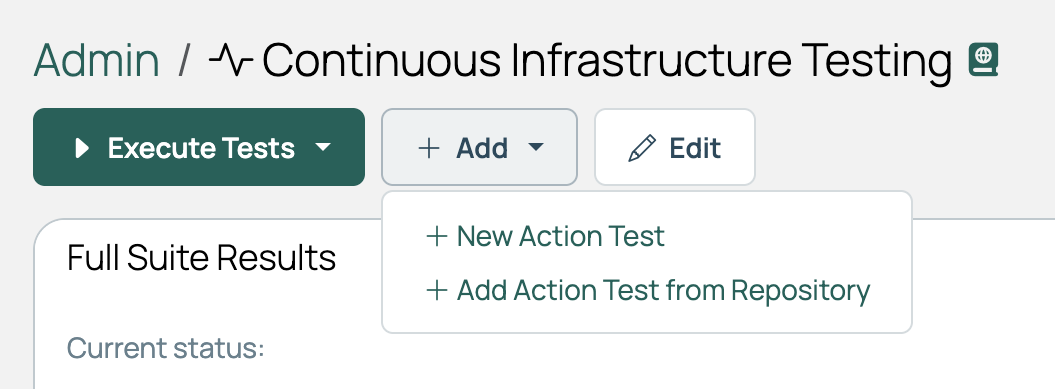
1. Choose an existing action, or create one.
## Run tests
1. Go to **Admin** > **Continuous Infrastructure Testing**.
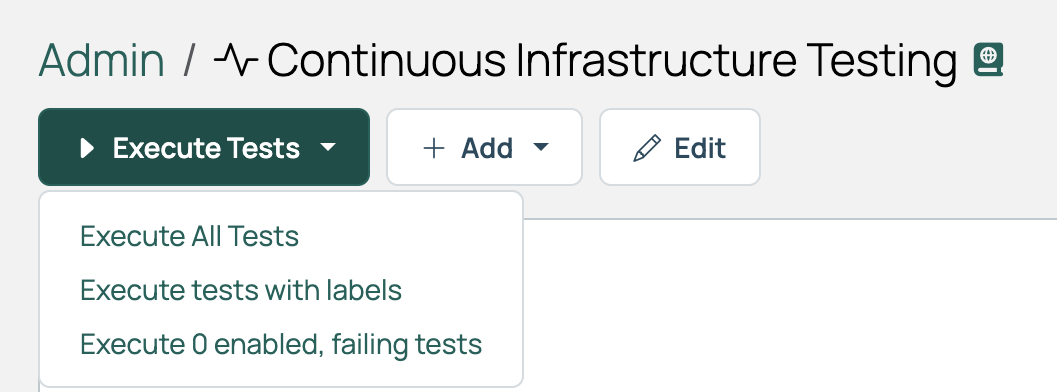
1. Select **Execute Tests**, then select **Execute All Tests** to run everything, **Execute tests with labels** to run a subset, **Execute enabled, failing tests** to run failing tests, or the play button on a single test.
### Schedule tests
Scheduled runs are driven by the **Run all CIT Tests** recurring job. Edit its schedule at **Admin** > **Recurring Jobs**; see [Schedule format](/docs/cmp/use/orchestration/recurring-jobs/manage/#schedule-format).
On a newly installed instance, the **Run all CIT Tests** job is disabled, so no tests run on schedule until you enable it. See [Built-in recurring jobs](/docs/cmp/use/orchestration/recurring-jobs/built-in/).
### Who owns the jobs a test creates
Jobs and orders created by scheduled test runs have no owner by default. To give them one, select **Edit CIT Settings** on the Continuous Infrastructure Testing page and choose a default owner. Pick an account whose name makes clear no human started the run, such as `cit_owner`, and check that it has the permissions your tests need.
Tests run by hand are always owned by the user who started them, regardless of whether a default owner is set.
### Retry a failing test
Set **Max Retries** on the test to have it re-run automatically until it passes or the limit is reached. A test that fails first and then passes is reported as a **Warning** rather than a **Failure**.
CMP waits 10 minutes before a retry. Change that under **Edit CIT Settings**.
### Run tests in parallel
CIT runs tests in serial unless you group them. Label a test `serialgroup:` and every test sharing that exact label runs in serial with the others in its group, while separate groups run in parallel. Unlabelled tests form an implicit group of their own, running in serial with one another alongside the labeled groups.
Give a test only one `serialgroup:` label. A test can belong to a single serial group.
## Read the results
The **Progress** section of the job details page shows the detailed output for each test, including what failed and links to the associated jobs.
### Fix a failing test
The order behind a test cannot be edited, nor can the test itself. Work around it by rebuilding the test from a corrected order:
1. On the **Jobs** page, open the failing job.
1. At the top of the content box, select the order link to open the original order.
1. Duplicate the order.
1. Make the corrections the job log points to.
1. Run the order and confirm it succeeds.
1. Create a new CIT test from the duplicated order.
1. Delete the original failing test.
## Email test reports
CMP emails Continuous Infrastructure Test results on failure.
1. Go to **Admin** > **Miscellaneous Settings**.
1. Open the **Resource management** tab and select to edit the **Settings**.
1. In **CB Admin Email Address(es)**, enter one address or a comma-separated list.
1. Select **Save**.
## Related
- [Built-in recurring jobs](/docs/cmp/use/orchestration/recurring-jobs/built-in/): the **Run all CIT Tests** job.
---
Section pages:
- [Check infrastructure health with CIT](/docs/cmp/use/orchestration/cit/infrastructure-health-checks/): Build a CIT test that verifies a resource handler's connection, so you find a broken cloud before your users do