# Orchestration actions
> Attach your own code to defined points in Cloud Management Platform (CMP) jobs, orders, and other processes
---
Site [llms.txt](/llms.txt)
---
An orchestration action runs at a **trigger point**, one of the many predefined places in CMP processes where custom code can run. Trigger points are grouped into categories on the **Admin** > **Orchestration Actions** page. If a trigger point invokes an action that requires additional inputs, provide defaults for that action in this context. The same underlying action can have different defaults when invoked from different trigger points.
## Find a trigger point
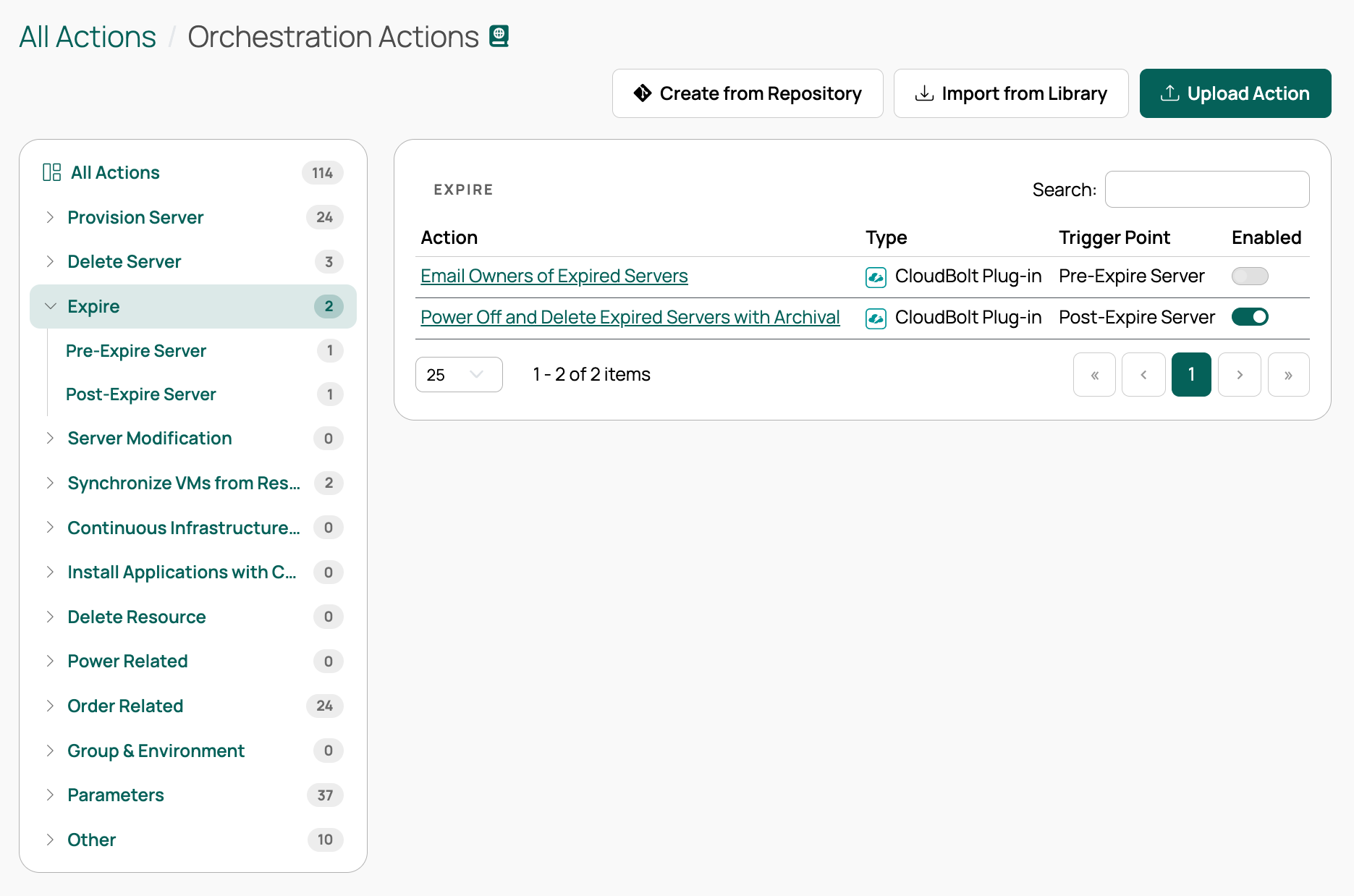
Go to **Admin** > **Orchestration Actions**. The tree on the left lists every category and, under each, its trigger points, each with a count of the actions currently attached. Select a category to see all of its actions, or select a single trigger point to narrow the table to that one. The table lists each action's name, type, trigger point, and whether it is enabled. When you scope the table to a single trigger point, the Trigger Point column is hidden, because the tree already shows which one you are looking at.
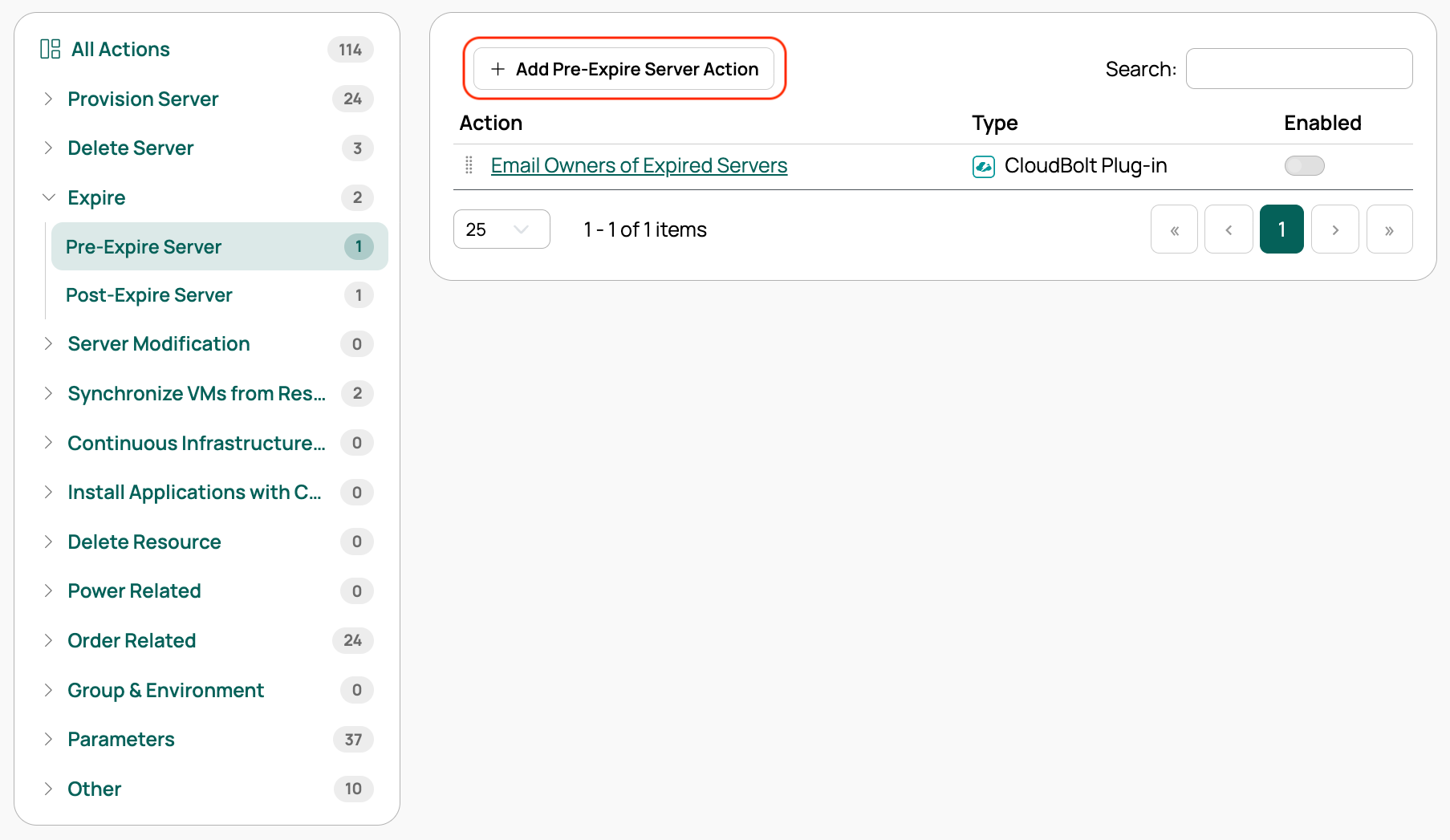
Selecting a single trigger point also reveals an add button named after that trigger point, such as **Add Post-Delete Action**. A new orchestration action must be attached to a trigger point, which is why the button stays hidden until you pick one. When the table is scoped to one trigger point, you can drag its rows to set the order in which the actions run.
Two trigger points, **Pre-Provisioning Engine Server Creation** and **Pre-Power-on**, appear only when at least one provision engine is configured. The **Terraform Related** category appears only when Terraform is in use.
## Trigger point categories
| Category | Trigger points |
| --- | --- |
| Provision Server | Pre-Provision, Generated Hostname Overwrite, Validate Hostname, Pre-Create Resource, Pre-Provisioning Engine Server Creation, Pre-Power-on, Pre-Network Configuration, During Resource Provisioning, Post-Network Configuration, Network Verification, Post-Network Verification, Pre-Application Installation, Ansible Automation Configuration, Post-Provision |
| Delete Server | Pre-Delete, Post-Delete |
| Expire | Pre-Expire Server, Post-Expire Server |
| Server Modification | Pre-Server Modification, Post-Server Modification |
| Synchronize VMs from Resource Handlers | Pre Sync VMs, Post Sync VMs, Pre Server Refresh |
| Continuous Infrastructure Testing | Pre-CIT, Post-CIT |
| Install Applications with Configuration Manager | Pre-Install Applications, Post-Install Applications, Pre-Uninstall Applications, Post-Uninstall Applications |
| Delete Resource | Pre-Delete Resource, Post-Delete Resource |
| Power Related | Pre Power On, Post Power On, Pre Power Off, Post Power Off, Pre Reboot, Post Reboot |
| Order Related | Generated Resource Name Overwrite, Blueprint Validation, Server Tier Validation, Order Submitted for Approval, Order Submitted for Approval Notifications, Post-Order Denied, Post-Order Approval, Post-Order Execution, Post-Order Execution Notification |
| Group & Environment | Post Group Creation, Pre Group Modification, Post Group Modification, Post Environment Creation, Pre Environment Modification, Post Environment Modification |
| Terraform Related | Terraform Pre-Provision, Terraform Init, Terraform Plan, Terraform Apply, Terraform Post-Provision, Terraform Provision Failure, Terraform Provision Cleanup, Terraform Pre-Destroy, Terraform Destroy, Terraform Post-Destroy, Terraform Destroy Failure, Terraform Destroy Cleanup |
| Parameters | Parameter Change, Generated Parameter Options |
| Other | Pre-Job, Post-Job, Waiting for Config Manager Agent Checkin, SSO User Update, External Users Sync, Compute Server Rate, Validate IP Address, Validate Order Recipient |
## Continue on failure
An orchestration action can be set to continue on failure, which means that if the action fails, the rest of the job is unaffected. The job neither fails nor changes course. This is useful for actions that occasionally fail but whose failure does not prevent the job from completing successfully.
A few trigger points do not honor this setting, including the two trigger points in the **Parameters** category, as well as **Generated Hostname Overwrite**, **Pre Server Refresh**, and **Compute Server Rate**.
## Job trigger points
Actions can be executed at many points throughout the job flow. For each job type, actions are executed in the order listed below, where \ represents the job being run:
1. Pre-Job
1. Pre-\
1. The actual job runs, and can call out to additional trigger points specific to that job type, such as the trigger points in the Provision Server category
1. Post-\
1. Post-Job
**Pre-Job** and **Post-Job** are in the **Other** category rather than under a specific job type, because they apply to every job.
By default, post-job actions run regardless of the main job's result, even if the main job fails. To run an action only when the job finished with particular statuses, edit the action at that trigger point and set the statuses it should run on.
## Provisioning job trigger points
The Provision Server job has trigger points that occur during the job, not just before and after it. Under **Provision Server** in the tree, the trigger points are listed in the order they are executed during a provision job.
## Order trigger points
The **Order Related** category covers validation, approval, and execution of orders. The trigger points used most often are:
- **Order Submitted for Approval**: Executes when an order is submitted for approval. Mainly used to integrate CMP with third-party change management systems.
- **Post-Order Approval**: Executes after an order is approved and before jobs are created. Used to alter job parameters before they are executed.
- **Post-Order Execution**: Executes when an order is marked as completed, whether it succeeded or failed.
The category also includes **Generated Resource Name Overwrite**, **Blueprint Validation**, **Server Tier Validation**, **Post-Order Denied**, and two notification trigger points: **Order Submitted for Approval Notifications** and **Post-Order Execution Notification**.
Form validation for blueprint orders without server tiers is handled at **Blueprint Validation**. For blueprints that require server-tier validation, use **Server Tier Validation**.
**Order Submitted for Approval** and **Post-Order Approval** are also used in custom order approval workflows. For more information about implementing your own approval workflow, see [Special case plugins](/docs/cmp/use/orchestration/plugins/special-cases/). To customize blueprint deployment specifically, see [Blueprint actions](/docs/cmp/use/blueprints/build/blueprint-actions/).
## Group and environment trigger points
The **Group & Environment** category contains six trigger points:
- **Post Group Creation** and **Post Environment Creation** are passed an argument called `group` and `environment`, respectively.
- **Post Group Modification** and **Post Environment Modification** are also passed an argument called `group` and `environment`, respectively.
- **Pre Group Modification** actions are passed arguments called `group` and `existing_group`. Compare the two in the action; if the action returns a FAILURE status or raises an exception, the object is not saved. These actions do not run when many-to-many relationships on the group change, such as its parameters, only when the group itself is saved.
- **Pre Environment Modification** actions are passed arguments called `environment` and `existing_environment`. Compare the two in the action; if the action returns a FAILURE status or raises an exception, the object is not saved. These actions do not run when many-to-many relationships on the environment change, such as its parameters, only when the environment itself is saved.
These trigger points do not respect the group and environment filters on actions.
Here is a sample Pre Group Modification plugin:
```python
"""
This plug-in, to be run at the "Pre Group Modification" trigger point, prevents
any modification to groups that add "cheese" to their description.
"""
from common.methods import set_progress
def run(job, group=None, existing_group=None, *args, **kwargs):
if existing_group.description == group.description:
set_progress("No change in group description.")
return
# These messages will show up in CB's application.log
set_progress(f"Group's description was: {existing_group.description}")
set_progress(f"Group's description will be: {group.description}")
if "cheese" in group.description:
return ("FAILURE",
"Invalid group description",
"'cheese is not allowed in the group description.'")
```
## Parameter trigger points
The **Parameters** category contains two trigger points:
- **Parameter Change**: Executes whenever a user changes a parameter on a server. Use it to alter the server or contact another system when parameter values change.
- **Generated Parameter Options**: Dynamically determines which options are presented to a user for a parameter and can specify an initial value among those options. These actions contain a `get_options_list` method that returns either a list of option tuples or a dictionary containing both the options and the initial value. See [Action input parameters](/docs/cmp/use/orchestration/actions/action-input-parameters/), where the method has the same possible return values.
## User trigger points
Two trigger points in the **Other** category relate to users:
- **External Users Sync**: Executes each time an external (AD or LDAP) user logs in. Use it to update a user's permissions and group membership in CMP based on data held in the directory.
- **SSO User Update**: Executes when a user logs in through single sign-on. See [SSO orchestration actions](/docs/cmp/configure/access-and-security/users/sso-saml/orchestration-actions/).
## Terraform orchestration actions
The way Terraform commands are invoked is exposed as Terraform orchestration actions, allowing administrators to customize both how Terraform is invoked and how the resulting resources are integrated with CMP. The **Terraform Related** category is shown only when Terraform is in use. See [Terraform operations](/docs/cmp/use/orchestration/terraform/).
## Related
- [Plugins](/docs/cmp/use/orchestration/plugins/)
---
Section pages:
- [Minimize technical debt with orchestration actions](/docs/cmp/use/orchestration/actions/orchestration-actions/minimize-technical-debt/): Clean up the dependencies a server leaves behind, and remove servers whose provisioning failed
- [Network address translation](/docs/cmp/use/orchestration/actions/orchestration-actions/network-address-translation/): Represent NAT on the IP addresses of servers that Cloud Management Platform (CMP) manages