# VMware vCenter
> A VMware vCenter resource handler connects to a vCenter server and manages the templates, networks, datastores, and virtual machines in its clusters
---
Site [llms.txt](/llms.txt)
---
Cloud Management Platform (CMP) supports vCenter versions 6.5 through 9.x. A CMP environment is created for each imported cluster. The VMware Cloud on AWS resource handler is deprecated — use this handler for VMware Cloud on AWS virtual machines.
## Before you begin
- The hostname of the vCenter server and an account CMP can authenticate with. For the privileges that account needs, see [Minimum required permissions in vCenter/VMware](/docs/cmp/configure/infrastructure/resource-handlers/vmware-vcenter/minimum-permissions/).
- Network rules that allow HTTPS on port 443 between the CMP server and every vCenter and ESX host.
## Add a vCenter resource handler
1. Go to **Admin** > **Resource Handlers**, select **Add**, then select **VMware vCenter** under **Private Cloud**.
1. Fill in the credentials dialog and select **Continue**.
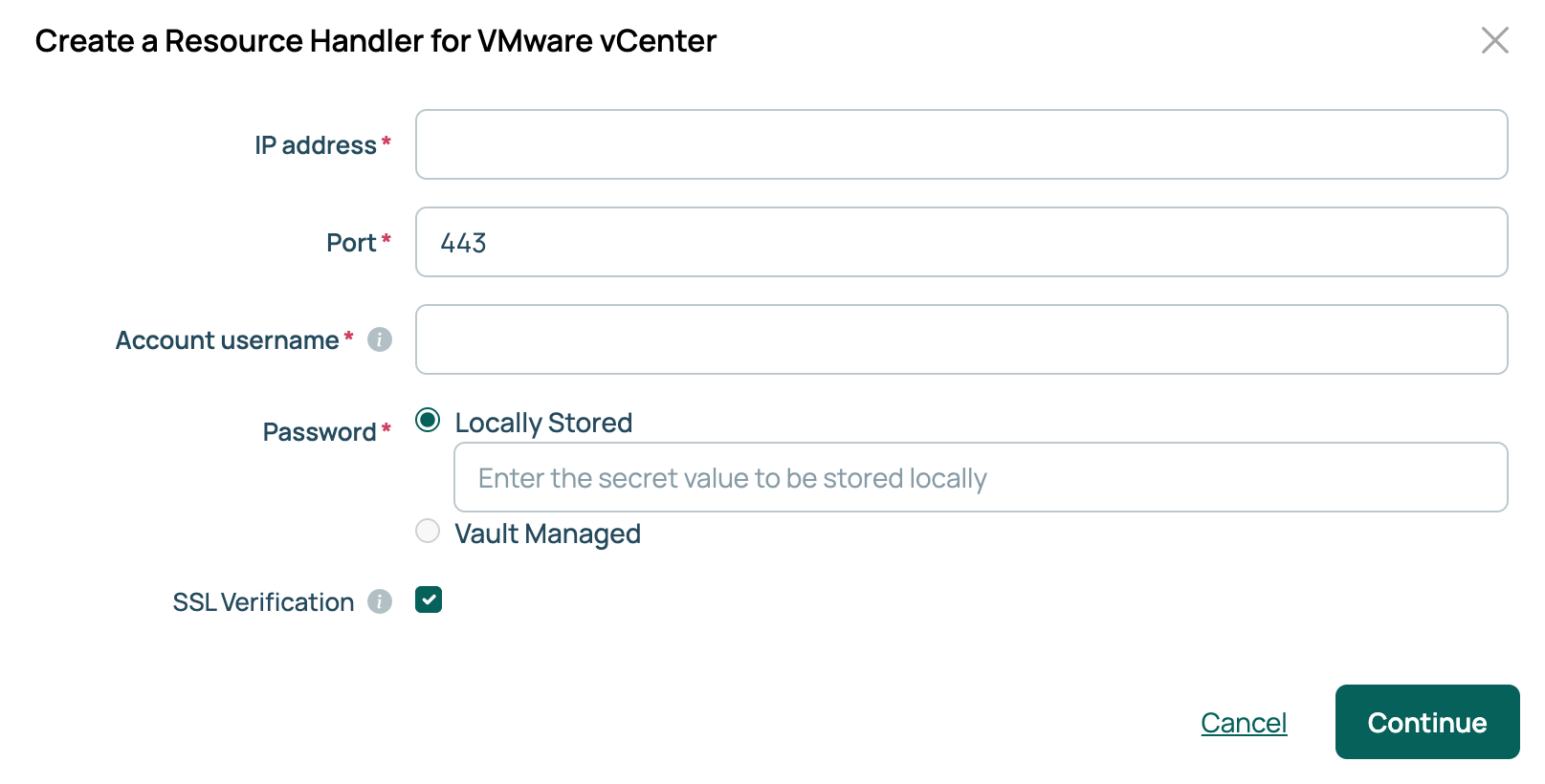
1. Enter a name and an optional description, choose clusters under **Import VMware Clusters**, set any remaining options, then select **Done**.
You must select at least one cluster. CMP creates an environment per cluster and runs a **Sync Resource Handler metadata** job to import the clusters, datastores, datastore tiers, networks, and templates.
| Field | Description |
| --- | --- |
| **IP address** | The host name or IP address of the vCenter server. |
| **Port** | The API port. Defaults to `443`. |
| **Account username** | The vCenter account CMP authenticates as. CMP uses it for every management action, including creating servers, power operations, and syncing. |
| **Password** | The password for that account. If the password vault feature is enabled, this field offers **Locally Stored** or **Vault Managed**. Select **Vault Managed** to read the secret from a configured vault provider. See [Use password vaults](/docs/cmp/configure/access-and-security/security/use-password-vaults/). |
| **SSL Verification** | Whether CMP verifies the vCenter server's SSL certificate. |
The settings dialog also includes **Virtual folder path**, remote console options, and **Split by cluster**, which splits sync jobs so each one covers a single cluster. To change them later, open the handler's **Overview** tab and select **Edit Settings**.
## Import templates
An environment cannot be used until a template is imported and attached to it; the **Templates** tab shows a warning icon until this is done.
1. On the handler, open the **Templates** tab and select **Import templates**. The list comes from the vCenter server this handler is connected to.
1. Select templates, then select **Import selected templates**.
Select **Sync templates** to pick up templates added in vCenter since the last import.
## Networks
Import networks from the handler's **Networks** tab, and datastores from its **Storage** tab with **Import datastores**.
### Network adapter type
The network adapter type set on a template in CMP overrides the adapter type of the virtual machines provisioned from it in vCenter. It may also override the adapter type on the template in vCenter.
1. Go to **Admin** > **Integrations** > **Networks**.
1. Select the network name, then select **Edit**.
### NSX
If your vCenter supports advanced network configurations such as VXLANs and edge appliances, configure them on the handler's **NSX** tab.
#### NSX endpoint
Defines the *NSX Manager* connection used to create VXLANs and edge appliances. See [Network virtualization](/docs/cmp/configure/infrastructure/networks/network-virtualization/).
#### Edge Gateway Configuration
Sets the defaults used when creating an NSX Edge Services Gateway appliance, such as **Provider Network**, **Cluster**, **Datastore**, and **CLI Credentials**.
The provider network specified in the NSX Edge Configuration must be associated with an **IP Pool**; otherwise, CMP cannot determine the IP address for the gateway's uplink interface. That network also needs a gateway and netmask configured in CMP.
## vCenter parameters
The following parameters are imported, with options populated by CMP from what it discovers in vCenter.
| Parameter | Description |
| --- | --- |
| **VMware Datastore** | Required. The datastore where a server's disks are placed. |
| **VMware Disk Provisioning Type** | Required. How the disk is provisioned. |
| **VMware Resource Pool** | The resource pool a server is created in. |
| **NSX Transport Zone** | The NSX transport zone to use. Applies only when the handler has an NSX endpoint. |
| **NSX Edge** | The NSX edge appliance to use. Applies only when the handler has an NSX endpoint. |
**VMware Cluster** is not a parameter you set: CMP records it in the environment on import. **VMware Adapter Type** is set per network interface rather than per server. You can add **VMware Datastore Free Space** to an environment as described below.
## Disks
### VMware Datastore Free Space parameter
Give this parameter a single option on the environment. It matters most when adding a disk to an existing server.
If the server has no value for it, because it was discovered or built before the parameter was configured, CMP falls back to the environment and takes the first option it finds, so a single option is the safer configuration. If neither the server nor the environment has a value, CMP uses the global default. Global options and options set on a group are not consulted when adding a disk.
### Modify or add disks
vCenter needs a datastore and a disk provisioning type whenever a disk is added. The modification API accepts these parameters:
- `disk_size`: the new size for the original disk.
- `new_disk_size`: the size of a disk being added.
- `vmware_datastore`: the datastore to provision the disk to.
- `vmware_disk_type`: the provisioning type for the disk.
## VM customization
By default, CMP uses the guest customization tools in a vCenter template to set the host name, IP address, DNS servers, WINS servers, domain membership, and similar values on a new virtual machine.
For finer control over Windows, add the **Sysprep Answer File** parameter to a vCenter-backed environment and set its value to the contents of an unattend.xml file. CMP treats the file as a template, so values such as `{{ server.hostname }}` resolve at build time. See [Using Windows Sysprep with resource handlers](/docs/cmp/use/servers/windows-sysprep/).
When a Sysprep answer file is supplied, CMP ignores every other customization parameter. The answer file must specify all of them.
## Tags
CMP treats every VMware tag as having single cardinality: one tag value per category per virtual machine. If a VMware category allows several tags, only one of their values appears in CMP. Changing the value of a parameter linked to a tag in CMP removes the other values from the virtual machine.
Tags are synchronized only with vCenter 6.5 or later.
vCenter tags do not sync both ways. Tags added in vCenter are synced to CMP, but tags removed in vCenter remain in CMP.
## Snapshots
vCenter servers support snapshots. See [Snapshots](/docs/cmp/use/servers/snapshots/).
## Virtual folder path
CMP places provisioned virtual machines in a folder on the vSphere client, and gives each group a subfolder of the same name. The default path is `CloudBoltVMs/{{ group }}`.
Change it with the same template syntax used for [hostname templates](/docs/cmp/configure/order-forms-and-pricing/parameters/parameter-templates/hostname-specification/).
### Virtual folder path options
#### CloudBolt VM directory
```text
CloudBoltVMs/{{ group }}
```
`CloudBoltVMs/` is the root directory for virtual machines, and `{{ group }}` is the current group's name. It produces paths such as `CloudBoltVMs/Development` and `CloudBoltVMs/Production`.
#### Check for parent groups
```text
{% if group.parent %}/{{ group.parent }}/{{ group }}{% else %}/{% endif %}
```
This builds the path from the group hierarchy: a group with a parent gets both names, so "Subfolder" under "Parent" becomes `/Parent/Subfolder`, while a group with no parent becomes `/Group`.
### Specify a virtual folder path
1. Go to **Admin** > **Resource Handlers** and select your vCenter handler.
1. On the **Overview** tab, select **Edit Settings**.
1. Enter the path in **Virtual folder path**, then select **Save**.
## Related
- [Network virtualization](/docs/cmp/configure/infrastructure/networks/network-virtualization/): set up the NSX connection this handler maps to.
---
Section pages:
- [Minimum required permissions in vCenter/VMware](/docs/cmp/configure/infrastructure/resource-handlers/vmware-vcenter/minimum-permissions/): The vCenter account a resource handler authenticates as needs a role with the privileges below
- [Use vCenter APIs](/docs/cmp/configure/infrastructure/resource-handlers/vmware-vcenter/use-vcenter-apis/): Reach vCenter directly from plugin code through its vSphere Web Services API or its vSphere Automation API